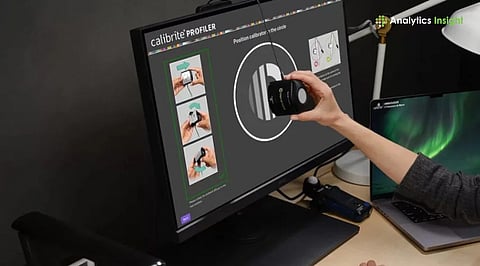
.png)

Regular monitor maintenance and calibration keep colors accurate and extend the display lifespan.
Tools like the X-Rite i1Display Pro ensure reliable professional color performance.
OLED and QD-OLED screens offer high-quality visuals but need consistent care as the display market evolves.
Modern monitors are important tools for work, entertainment, and creative projects. Over time, even high-quality screens slowly lose brightness, shift in color accuracy, and collect dust that affects clarity. Regular maintenance and proper calibration are necessary to increase the devices' life span. A well-maintained and well-calibrated display performs consistently and produces visuals that meet real-world expectations.
Every monitor changes slightly over time. The backlight becomes dimmer, colors drift, and the screen coating gathers fingerprints and dust. These changes may be small at first, but they gradually affect how images look. For tasks like photo editing, video production, and printing, color accuracy is extremely important.
Major calibration companies suggest that most modern LCD screens should be re-profiled at least once every four weeks, and those used for crucial workflows like color grading may need even more frequent checks.
Regular calibration ensures screens show accurate colors, correct brightness levels, and stable contrast. Otherwise, visual outputs can be inconsistent, causing problems in design work and even everyday viewing.
Gentle daily care is one of the simplest ways to protect a monitor. Turning off the display and wiping it with a clean microfiber cloth removes dust and smudges that can dull the image. A soft cloth works better than paper towels, which can scratch the surface.
Many major brands advise never spraying liquid directly onto the screen. Instead, any cleaner should be placed on the cloth first. Distilled water or approved display-cleaning solutions are safest, while harsh household cleaners can damage the anti-glare surface.
Even weekly dust removal around the frame and ports helps prevent debris from collecting in small gaps. Using a can of compressed air carefully around the edges can remove dust that may eventually affect the monitor’s ventilation or bezel areas.
Also Read - Top 10 LCD Monitors for Visual Clarity and Productivity
A deeper check every month keeps track of changes that may not be immediately visible. Many modern monitors have built-in tests for uniformity, color accuracy, or pixel defects. Performing these tests helps users identify new issues. Checking cables and ports is also important because loose or damaged connections can cause flickering.
Professionals who depend on color accuracy usually recalibrate monthly, sometimes every two weeks, depending on the panel's stability and workload. Even monitors that arrive with a factory calibration certificate can benefit from regular recalibration as they age.
With calibration users can adjust their monitor to display colors and brightness as accurately as possible. This process is done in a stable environment where the room lighting is consistent and walls and surrounding objects don't cast strong colors. The monitor should warm up for 30 to 60 minutes before the process begins.
Different tasks require different settings. For everyday use and web content, the sRGB color space is common. For video editing, Rec.709 is popular. Digital cinema work uses DCI-P3, while future-focused workflows may use Rec.2020. Choosing the right color space ensures the output matches the intended format.
One important trend in recent years is the growing emphasis on “coverage” numbers rather than general claims. For example, monitors often advertise that they support a high percentage of a color space like DCI-P3. The overlap or coverage value is the more accurate indicator of how well the screen can reproduce that color range.
Colorimeters and spectrophotometers remain the most reliable tools for calibration. Professional reviewers still highlight the X-Rite i1Display Pro as a top option because of its accuracy and stability. Datacolor's SpyderX series is often recommended for people who want strong performance with a simpler setup.
Many new monitors, especially those built for creators, arrive with better factory calibration. Even so, experts continue to advise running an independent calibration, as factory calibration reflects conditions at the time of shipping. Regular recalibration ensures color accuracy stays stable as the monitor ages.
Calibration software guides the user through setting brightness, white point, gamma, and color space. After the process is finished, the software saves an ICC profile that tells the computer how to display colors correctly on that specific screen.
For people using multiple monitors, matching settings across screens is important. The goal is to match brightness and white point, not necessarily to match the full color gamut, since different panels have different capabilities.
Applications like photo editors and video editors should always run in color-managed mode. This ensures the colors inside the program match the calibrated profile.
Also Read - Monitor Connectivity & Ergonomics: What to Look for (USB-C, Thunderbolt, Height Adjustment)
The display market in late 2025 shows several clear trends. Mid-range 1440p monitors are now the most popular choice for general work because they offer a strong balance between price and clarity.
OLED and QD-OLED screens are much more common in creative environments as they provide deeper contrast and higher color accuracy. However, OLED displays still require some care to avoid burn-in from static images.
Manufacturers are also focusing heavily on sustainability and better factory calibration. Many new 4K, 5K, and OLED creator monitors provide strong color performance right out of the box, but calibration is important for print-matched or broadcast-level accuracy.
Good maintenance and calibration habits extend a monitor’s lifespan. Keeping brightness at a moderate level helps the backlight last longer. Avoiding long periods of still images, especially on OLED displays, prevents screen retention. Reporting defects early during the warranty period is also important, as manufacturers often have strict timelines for replacements.
Regular cleaning, careful handling, and periodic calibration are the keys to keeping any monitor performing at a high level. These habits preserve color accuracy, image clarity, and overall reliability. With modern display technologies evolving quickly, maintaining consistency ensures a monitor continues to deliver accurate, dependable results for years.
1. What is monitor calibration, and why is it important?
Monitor calibration adjusts color, brightness, and contrast so the display shows accurate and consistent visuals, which is essential for design, editing, and professional work.
2. How often should a monitor be calibrated?
Most modern displays benefit from calibration every 2–4 weeks, especially for color-critical tasks, while casual users can recalibrate every few months.
3. Do OLED and QD-OLED monitors need special care?
Yes, OLED and QD-OLED panels require careful brightness settings and avoidance of long static images to reduce the risk of image retention or burn-in.
4. Is a tool like the X-Rite i1Display Pro necessary?
Professional-grade color accuracy is best achieved with a hardware device like the X-Rite i1Display Pro, which provides more precise results than software-only methods.
5. Does factory calibration mean a monitor never needs recalibration?
No, factory calibration only reflects the monitor’s condition at the time of manufacturing; color performance changes over time, so periodic recalibration is still needed.
