.png)

Instagram Broadcast Channel is a one-way messaging tool that lets creators share updates directly with followers.
Only creators with access to the Instagram app can start and manage their broadcast channels.
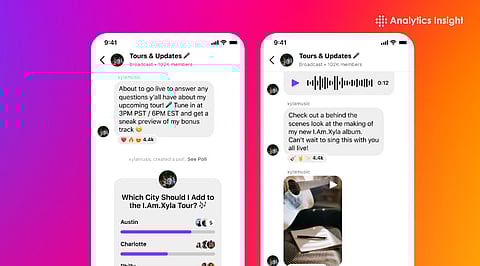
Channels support text, photos, video, voice notes, and interactive features like polls.
Instagram Broadcast Channel has quickly become one of the most impactful tools for creators aiming to share updates. This makes communication more organized and meaningful. It also increases the possibility that updates are seen, thereby increasing the visibility.
As Instagram expands this feature worldwide, the interest to master it continues to rise across content categories. A lot of creators view it as an effective way to build stronger communities and enhance engagement. This growing demand makes a beginner-friendly guide necessary for those wanting to stay ahead in an evolving digital space.
Also Read: 10 Best Instagram Channels for Interview Preparation
Instagram Broadcast Channel is a public, one-to-many communication feature that lets creators send updates straight to followers without relying on the general feed algorithm.
Creators can post text and media updates, polls, and voice notes that followers can react to, building direct engagement at large scale. The followers are notified only once about the new channels, and they can control the notifications through settings.
To make a new Instagram Broadcast Channel, first launch the Instagram mobile app and navigate to your DMs. Tap the compose icon, and then see the create broadcast channel option at the top of the list.
Then, pick a channel name that suits your content and select the audience type, like just followers or subscribers. Moreover, you can choose whether you want to display the channel link on your profile. Finally, tap on the Create broadcast channel option to finish the process.
After setting up the channel, post regularly and use interactive elements like polls to maintain visibility and interest. Instagram displays channels to followers next to chats, so updates feel timely and direct.
Once active, post brief updates and upload rich media consistently to attract attention faster. Moreover, you can ask polls or questions to interact with your followers and get feedback.
By putting a join channel sticker in your Stories or linking it to your profile, you can attract your followers to become part of your channel. This is a great way to expand your audience beyond just regular posts. In addition, creators can collaborate with other creators or fans, which makes the content more vibrant and dynamic.
Instagram Broadcast Channel is a significant upgrade from traditional feed posts since it lets creators reach followers directly without depending on the algorithmic placement of posts. Hence, the content is sent to the inboxes first, which results in heightened visibility and interaction. For anyone focused on growing and retaining audiences, learning how to create an Instagram Broadcast Channel is essential now more than ever.
1. Why can't I create an Instagram broadcast channel?
If you can't create an Instagram broadcast channel on Instagram, it could be because you need at least 10,000 followers and a Creator account. Make sure your app is updated, as older versions may not show the feature.
2. How many followers does it take to make an Instagram channel?
Channels can be started by a public account with more than 1,000 followers. We are actively working to improve the experience and make the feature available to more accounts on Instagram in the future.
3. Do Instagram channels make money?
Yes, people make money on Instagram through various methods like brand sponsorships, affiliate marketing, selling products/services, and using Instagram's built-in tools.
4. Can I get paid with 500 followers?
To make money on Instagram with 500 followers, sign up for affiliate programs to share links and earn commissions. You can also set up an online store and a digital tip jar. Be sure to take advantage of sponsored posts and network with other local businesses.
5. What kind of content works best on Instagram?
The best Instagram content blends short, engaging videos (Reels), interactive Stories (polls, Q&As), and authentic behind-the-scenes glimpses, focusing on solving audience problems or showcasing transformations.
