.png)

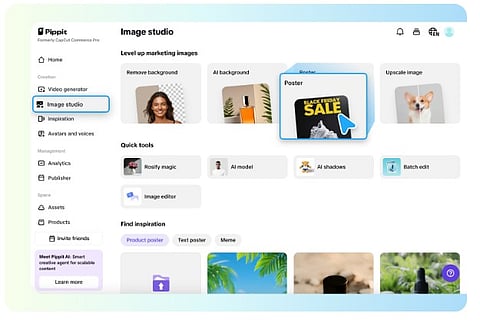
Digital content creation has been transformed in ways that were hardly imaginable just a few years ago with the help of artificial intelligence. Pippit AI talking photo is one of the most exciting innovations that allows a still image to speak with precise lip movements. It enables the character to express intended emotions realistically.
Professionals from different industries like content creation, marketing, education, and even business owners are now using talking photo AI free tools. These tools allow them to create engaging videos without advanced editing skills. In this guide, you will learn the exact steps to create an AI talking photo step by step, using free tools. Additionally, you will also understand its benefits, use cases, and best practices for professional results.
An AI talking photo is a digitally animated image where artificial intelligence generates facial movements and synchronized lip motion based on audio or text input. Instead of recording a live video, users can upload a single photo, add a voice or script, and let AI do the rest. These photos can blink, smile, and speak naturally, making them ideal for social media videos, presentations, ads, and explainer content. The rise of talking photo AI free platforms has made this technology accessible to everyone, even beginners with no technical background.
The popularity of AI talking photos is growing rapidly because they save time, reduce costs, and increase engagement. Creating a traditional video requires cameras, lighting, actors, and editing skills, while an AI talking photo can be created in minutes. Businesses use them for product explanations and customer support, educators use them for interactive lessons, and influencers use them to stand out on platforms like Instagram, TikTok, and YouTube Shorts. With free AI tools available, creators can experiment without financial risk.
Creating an AI talking photo is simpler than it sounds. With the right tool and a good-quality image, you can produce impressive results in a few minutes. The following steps explain the complete process clearly and practically.
The quality of your AI talking photo depends heavily on the image you upload. Choose a clear, front-facing photo with good lighting and visible facial features. Avoid blurry images, heavy shadows, or extreme angles. A neutral expression works best, as AI can animate it more naturally. Whether you are using a personal photo, a brand mascot, or a stock image, ensure you have permission to use it.
There are several talking photo AI free tools available online that allow limited free usage. These tools typically offer basic features such as text-to-speech, facial animation, and video export with watermarks. When choosing a platform, look for ease of use, natural lip-sync quality, and voice options. Some tools also allow multiple languages and accents, which is helpful for global audiences.
Once you select a tool, upload your photo and follow the on-screen instructions. Most platforms automatically detect facial landmarks like eyes, lips, and jawline. Some tools allow minor adjustments to improve accuracy. Take a moment to preview the alignment, as proper face detection ensures smoother animation and realistic movement in your AI talking photo.
This is where your AI talking photo comes to life. You can either type a script and use AI-generated voice or upload your own recorded audio. Free tools usually offer several voice styles, including male, female, calm, energetic, or professional tones. Keep your script concise and natural for better lip synchronization. Short sentences often produce more realistic results than long, complex phrases.
After adding the voice or text, generate the video. Most talking photo AI free tools process the animation within seconds or minutes. Preview the result carefully and check lip movement, facial expressions, and audio clarity. If something feels off, adjust the script, voice speed, or photo alignment and regenerate the video.
Once satisfied, download the final video. Free versions may include watermarks or limited resolution, but they are still suitable for testing, social media posts, or internal use. You can share your AI talking photo on platforms like Instagram, Facebook, YouTube, websites, or presentations to capture attention and deliver messages creatively.
AI talking photos are versatile and can be used across many industries. Businesses use them for product demos, announcements, and onboarding videos. Marketers use them for ads, landing pages, and email campaigns. Educators use them to create engaging lessons and explain complex topics visually. Even individuals use talking photo AI free tools for greetings, storytelling, or personal branding. The ability to turn a static image into a speaking character opens endless creative possibilities.
To get the best results, keep your script conversational and avoid robotic phrasing. Choose voices that match the personality of your photo. Use high-resolution images and neutral backgrounds for a clean look. Avoid overloading the video with long speeches; shorter clips tend to look more natural and engaging. If you plan to use AI talking photos regularly, consider maintaining consistent visual and voice styles for brand recognition.
While talking photo AI free platforms are powerful, they do have limitations. Free plans often include watermarks, limited export quality, restricted voice options, or usage caps. Facial expressions may sometimes look less natural compared to premium versions. However, for beginners, testing ideas, or small projects, free tools provide more than enough functionality to explore this technology effectively.
AI talking photo technology is evolving rapidly. Future advancements will likely include more realistic facial expressions, emotional intelligence, real-time interaction, and deeper personalization. As AI improves, talking photos will become almost indistinguishable from real video, making them even more valuable for communication, marketing, and education. The increasing availability of free tools means more creators can adopt this technology without barriers.
It is no longer a complex or expensive task to create an AI talking photo. Anyone can easily transform a simple image into an engaging, speaking video within minutes using talking photo AI free tools. You can follow the step-by-step process above, choose the appropriate photo, write a natural script, and use the best AI tool to create content that looks professional and delivers your message effectively. In short, AI talking photos are a powerful addition to your content creation toolkit, whether you are a beginner or a digital professional.
