.png)

YouTube Shorts limits help parents reduce endless scrolling and protect kids’ focus, sleep, and daily routines.
Supervised accounts give parents absolute control, including strict limits or complete removal of Shorts access.
Healthy screen habits grow faster when smart settings are paired with honest conversations, not just restrictions.
Instant digital entertainment is now a trend among Gen Z, and as its popularity grows, YouTube Shorts has become the top choice for children's online content consumption. The short, vertical videos are engaging, user-friendly, and designed for quick navigation.
Shorts are captivating and also allow children to get carried away very easily with their viewing. This has been a daily battle for parents, rather than a concern raised occasionally.
In response, YouTube has launched new tools that enable families to Control Shorts Screen Time for Kids, keeping digital content in balance rather than overwhelming.
Short-form video platforms are built to keep viewers watching. Because Shorts autoplay and last only seconds, children can scroll for long periods without realizing how much time has passed. This behavior can affect focus, sleep routines, and overall screen habits for kids over time.
YouTube introduced Shorts feed limits as part of a broader push toward digital well-being. These updates encourage intentional viewing instead of endless consumption. They also help ease YouTube Shorts privacy concerns by giving parents more visibility into how children interact with recommended content.
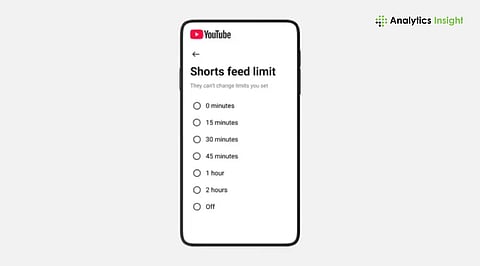
The feed limit lets users set a time limit for YouTube Shorts, separate from the one for standard YouTube videos. As soon as the limit is reached, an on-screen message pops up, notifying the viewer that their Shorts viewing time has ended.
For regular accounts, this message works as a reminder. For supervised accounts, the limit can be strictly enforced, meaning Shorts will not be available until the next day. This difference is significant. Reminders increase awareness, while enforced limits provide young users with distinct boundaries.
Parents can limit Shorts through the YouTube app on Android, iPhone, or tablets:
Open the YouTube app and tap the profile picture
Go to Settings, then select General
Click on the option to set a limit for the Shorts feed
Select the preferred daily duration
After it is turned on, YouTube counts only time spent actually watching Shorts as active time for the user, giving a more realistic view of daily usage rather than total app time.
The most effective controls come through supervised accounts. YouTube will let parents control access to Shorts for their kids and teenagers very accurately.
In supervised settings, parents can even establish a zero-minute restriction. This eliminates the Shorts feed from the child’s screen. These restrictions can be accessed only by a parent, making it impossible for the child to change them on their own.
This makes the answer to the question 'can parents control YouTube Shorts screen time' a clear yes, especially when supervision tools are properly set up.
To gain more control, parents can choose between the YouTube Family Center and Google Family Link. These instruments give families the power to:
Impose daily limits on viewing time
Prohibit access to YouTube during night hours
Watch the history of viewing
Distribute screen time among different gadgets
Google Family Link is an excellent tool for making it easier to respect nighttime restrictions, thereby preventing Shorts from disrupting children's sleep.
Limits alone are not enough. YouTube also offers 'Take a Break' reminders and viewing history features that help parents. Reviewing what children watch encourages awareness rather than resistance.
For younger kids, the YouTube Kids app remains the safest choice. It includes a timer that shuts down the app when the time runs out. This makes screen boundaries simple and consistent.
Control Shorts Screen Time for Kids is about teaching them discipline. Technical boundaries can be made, but the habits will be built through guidance. If parents use YouTube tools along with good communication, the children will know when to consume and when to retreat from the content.
By implementing new YouTube Shorts settings, addressing privacy issues with YouTube Shorts, and applying thoughtful restrictions, the family can enjoy digital entertainment as part of their lives without making it the center of their lives.
1. Can parents fully block YouTube Shorts for kids?
Yes. With supervised accounts, parents can set a zero-minute limit, which completely removes the Shorts feed from the child’s app.
2. Do Shorts limits affect regular YouTube videos too?
No. Shorts limits apply only to the Shorts feed, so kids can still watch regular videos within their allowed screen time.
3. Can kids bypass Shorts time limits on their own?
Not on supervised accounts. All limits are locked behind a parent passcode, so children cannot change them on their own.
4. Is YouTube Kids safer than regular YouTube for younger children?
Yes. YouTube Kids offers stronger filters, age-appropriate content, and a built-in timer that automatically ends viewing.
5. Are screen-time limits enough to manage kids’ viewing habits?
Limits help, but conversations matter more. When parents explain balance, kids learn to self-regulate over time.
