.png)

Annual billing saves 33% ($60 per year) compared to monthly payments.
Canva Pro includes premium AI tools, Brand Kit, Magic Resize, and Background Remover.
Best suited for freelancers, marketers, businesses, and regular content creators.
Canva offers a simple editor, ready-made templates, AI tools, and millions of design elements in one place. Canva offers a free version for basic work, while Canva Pro unlocks premium tools and content for users who need more features.
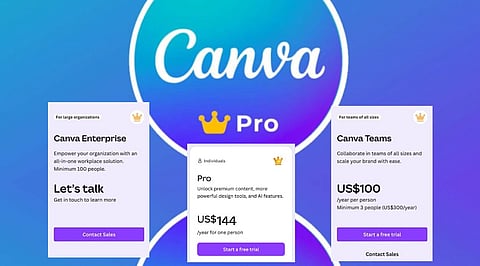
The Canva Pro plan costs $15 per user each month with monthly billing. The annual plan costs $120 per user each year, which works out to $10 per month. Anyone who selects yearly billing saves $60 every year compared with paying every month.
Canva Pro includes a large collection of premium features that help users complete creative work faster. Members receive access to millions of premium templates for presentations, social media posts, business documents, videos, and marketing materials. The subscription also opens a huge library of premium photos, graphics, videos, icons, illustrations, and fonts that support almost every design project.
The plan also includes advanced AI tools. Canva AI helps users create text, images, presentations, and other content with simple prompts. Magic Write supports content creation, while Magic Edit changes selected parts of an image. Magic Eraser removes unwanted objects from photos. These tools reduce editing time and help users create polished designs with less effort.
One of the biggest advantages of Canva Pro comes from its branding features. The Brand Kit stores company logos, brand colors, and fonts in one place. Every new project can follow the same style without extra setup. This feature helps businesses create consistent marketing materials across different platforms.
Magic Resize adds another layer of convenience. A single design can change into several sizes for Instagram, Facebook, LinkedIn, posters, presentations, and many other formats within seconds. Instead of creating separate files from the start, users can adjust the size with a few clicks while keeping the design layout intact.
Also Read - Canva Pro vs Canva Free: Which Plan Is Worth It in 2027?
Canva Pro offers more than templates and graphics. The subscription includes the Background Remover, which separates the main subject from the background in just a few moments. This feature supports product images, profile photos, promotional graphics, and marketing campaigns.
The plan also includes the Content Planner for social media scheduling. Users can prepare posts in advance and publish them across supported platforms from one dashboard. Extra cloud storage gives more space for files, photos, videos, and completed projects. Premium animations and visual effects also help presentations and social posts stand out with a more professional appearance.
The free version of Canva serves beginners and casual users very well. It offers thousands of templates, basic editing tools, and limited AI features. Simple presentations, posters, invitations, and social media posts can reach a good quality without any payment.
Canva Pro expands every major area of the platform. Members receive premium templates, millions of extra design assets, advanced AI features with higher usage limits, the Brand Kit, Magic Resize, Background Remover, and social media scheduling tools. These additions make everyday design work faster and more flexible, especially for people who create content on a regular schedule.
How much value a subscription provides depends on how often someone is involved in design work. If the job relates to online content creation, like working with social media, creating presentations, building an online shop, or dealing with clients, users will certainly benefit from the subscription. Active designers will need premium images, tools for branding, photo editing services, and content scheduling tools at least once in a while. Users will get everything they need on one platform instead of obtaining a number of different services when using Canva Pro.
The annual subscription will provide users with even more value since the effective overall cost reduces to 10 dollars per month instead of 15 dollars with monthly payments. Users will thus save up to $60 each year by opting for annual payments.
For users who only require a few simple designs annually, the free tier provides sufficient functionality. Users rarely need premium tools for creating basic documents, school projects, or something similar. However, active designers, freelancers, and business owners can easily justify the subscription cost through regular use.
Canva Pro competes with several popular design platforms. With Adobe Express Premium priced around $9.99 per month, Microsoft Designer is accessible through selective Microsoft subscriptions and provides an array of AI features via chosen Copilot plans. All platforms come with their unique specialties, but Canva is top in the race for its range of design templates, AI tools, functions for branding, collaboration opportunities and content scheduling in one app.
Using the one-stop-shop strategy saves users from having multiple subscriptions in different creative assignments. Rather than working with multiple tools for image editing, visual creation and social media planning, customers have all the stages of the project in one app.
Why this Matters
Canva Pro pricing plays an important role in budget planning for creators, freelancers, students, and businesses. A clear understanding of plan costs and included features helps people select the right subscription without unnecessary spending. Careful comparison also reveals whether premium tools offer enough value for regular design work and long-term creative projects.
Canva Pro offers a balanced mix of creative tools, premium content, AI features, and branding options at a competitive price. The monthly plan costs $15 per user, while the annual plan costs $120 per user, equal to $10 per month. Annual billing saves 33%, or $60 each year, compared with monthly payments.
For anyone designing regularly, the premium assets, AI tools, brand kit, and scheduling features justify the cost. Casual users are fine on the free plan. Regular creators will get the most from the annual subscription.
1. How much does Canva Pro cost?
Canva Pro costs $15 per user per month with monthly billing or $120 per user per year with annual billing.
2. Is Canva Pro worth paying for?
Yes, if you design regularly. The premium assets, AI features, branding tools, and time-saving capabilities provide strong value for frequent users.
3. What is included in Canva Pro?
It includes premium templates, millions of stock assets, AI tools, Brand Kit, Magic Resize, Background Remover, Content Planner, and expanded cloud storage.
4. Can I use Canva for free?
Yes. Canva Free offers thousands of templates and essential design tools, making it suitable for casual users and students.
5. Which Canva Pro plan offers the best value?
The annual plan provides the best value, reducing the effective monthly cost to $10 and saving $60 per year compared with monthly billing.