.png)

Brands are increasingly eager to expand and engage with diverse audiences across multiple locations, campaigns, and time zones. They need a tool that can adapt to their goals.
And when I think about this, a QR code with multiple links comes into mind. Never heard about it? Let me give you a bit of an overview.
It’s a URL QR code that is more advanced in the sense that it automatically redirects users to specific web content based on preset conditions. It can behave differently depending on when, where, or how it’s used.
This advanced QR code generator solution features unique automation capabilities, enabling you to deliver smoother experiences to your audience and maximize your marketing impact through scans.
Let me tell you more about how it works, the benefits and uses it offers to businesses like yours, and how to create it.
A QR code for multiple links is a two-dimensional barcode that directs users to different destinations based on specific conditions.
As its name suggests, it can store more than one URL. And once you set a redirection type, the QR code will automatically open the web link most compatible with the condition.
For example:
Location-based redirect: The QR code sends users to different URLs depending on their country, region, or city.
Number of scans: The destination changes after the code is scanned by the user after a certain number of times.
Time-based redirect: The link changes based on the time of day the QR code is scanned.
Geo-fencing: Only people scanning within a specific area will be directed to a particular URL.
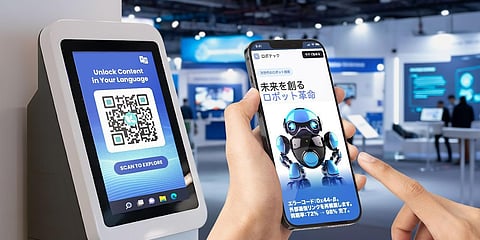
Language: Redirects users to different URLs based on the language set on their device.
Take note that these features vary from one generator to another. Some may offer only location-based redirection, while others support time-based options.
A smart QR code is a valuable asset for brands, particularly for those running campaigns across a country or the world. Since a single QR code can adapt in real time, you no longer need to generate and manage separate codes for every campaign variation.
There are multiple ways to use this QR code solution. Here are a few ideas:
Smart QR codes enable the delivery of country-specific content, which is particularly helpful when you're implementing a global or national marketing campaign.
For example, if you choose location-based redirection, a user in China will be sent to a Chinese page, while someone in India will be taken to an India-specific link.
The other redirection types are equally helpful when launching a large-scale campaign, enabling you to personalize content without creating multiple QR codes.
You can redirect people to different product pages based on their language using a multi-URL QR code.
This helps you globalize your brand and tailor the experience to each audience’s culture and preferences.
Imagine you’re launching a campaign for your brand. Not just any campaign, but an unconventional one. That’s where scan-count redirection becomes useful.
Trust me, you can create a buzz over it. By prompting people to scan the code and reach a specific number before they can access your hidden content, you achieve the kind of engagement you want.
Once the user reaches a certain number of scans, the next one will automatically redirect to a different destination, perhaps a page with a riddle they must decipher first, before proceeding to another page where they can unlock the surprise.
Planning a seasonal or time-limited promotional offer? Then it’s a great idea to use a QR code generator for multiple links.
Set a time-based redirection on your QR code so that it automatically redirects to a specific destination at a specified time.
For example, if your offer ends in 12 hours, anyone scanning the code after that will be directed to a different page.
If you’re a restaurant owner and need a special menu for a specific time, then it's a great idea to create a QR code with multiple links.
People scanning at a specific time will be redirected to the menu curated for that time.
Here’s an example: Someone who scans the code at 6 a.m. sees the breakfast menu, at 12 p.m. the lunch menu, and at 7 p.m. the dinner menu.
Many companies use QR codes in their hiring process, but there’s another trick to use them efficiently.
You may already have an idea about this, but when you post a job online, applications may come from everywhere, even if you’re only hiring in a specific region. This can make the screening process messy.
Using one QR code for multiple links with location-based redirection during the job hiring process, applicants are automatically redirected to the job postings relevant to their location.
This will help you organize and streamline the hiring process effortlessly.
Most brands now launch limited-edition products, and as the name implies, these products are available in limited quantities and are only sold at select locations.
A smart QR code helps manage the sales of these limited-edition drops in two ways.
First, redirect users to a different page after the deadline through time redirection.
The second method involves setting a virtual boundary, or “fence,” around a specific geographic area. When a smartphone user enters, exits, or remains within a specified boundary, it can trigger an action.
In this case, only those who are at a specific branch or partner store can access the reservation page of your limited-edition product.
You’ve probably heard customer service executives say, “Press 1 for English,” “Press 2 for French.”
With smart QR codes, you can offer that same language choice instantly just by scanning.
Using the language redirection, your Japanese customer will immediately access the Japanese support page, while a German customer will land on the German version.
If you run a salon, clinic, or any other service center, you can use time-based redirection for appointment scheduling.
People who scan the code before 12 PM can be sent to morning consultation slots, while anyone scanning after 12 PM can be redirected to afternoon appointments.
Now that you know the many valuable ways smart QR codes can be applied, you’re probably wondering how to create QR code for multiple links.
Here’s how you can create a smart QR code.
Step 1: Go to the advanced QR code generator of your choice.
Step 2: On the dashboard, select the Smart URL option.
Note that different platforms may use different names for this feature. Look for the one that stores multiple links and/or has redirection.
Step 3: Open the dropdown menu and choose the redirection type you want.
Step 4: Enter the required details and review everything after.
Step 5: Generate the QR code, customize as needed, and then download it.
A QR code for multiple links is an untapped marketing asset that’s waiting for you to discover. It simplifies your workflow, reduces errors, and provides more flexibility to run targeted promotions without requiring constant manual updates.
Using a smart URL QR code like this also makes your campaigns more targeted and far more effective, resulting in more scans, increased engagement, and greater brand traction.
You won’t just deliver content, you deliver context. And that’s what makes it a game-changer for modern digital interactions.
I’m Kunal Chouhan, a technical writer with experience across industries such as technology, ready to travel, eCommerce, real estate, and digital marketing. I focus on creating clear, engaging, and value-driven content that simplifies complex concepts and helps brands connect with their audience effectively.
