.png)

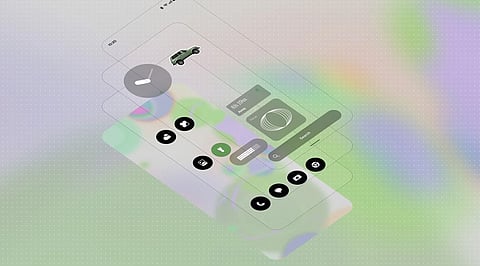
Fresh Interface: New lock screen clocks, adaptive colours, transparent widgets and redesigned system icons offer more personalisation.
Smarter Features: Glyph Timer, Essential Space upgrades, AI-powered tools and real-time translation make everyday tasks easier.
Better Performance: Android 17 enhancements promise smoother animations, faster app launches and improved memory management
Nothing OS 5.0 is a big update for Nothing phones. You get a refreshed home screen, some new Glyph tools and a wider set of AI features, all built on Android 17. Nothing showed it off on August 25, 2026, and opened the beta the next day. The stable rollout started on October 12 and will keep reaching more models in stages.
The overall look is still the clean Nothing style, but you now have more ways to make it your own. Colours can follow your wallpaper, tinted app icons keep the home screen consistent, and widgets can be transparent so the wallpaper shows through. System icons are redrawn, and the Geist typeface now appears in Settings, Camera, Gallery and the status bar.
The lock screen gets two new clocks. Gooey is bold and playful, while Micrographics looks like something off a piece of hardware and puts information first.
Glyph lights were mostly used for notifications and effects, and this update tries to make them more useful. Glyph Timer lets you start a countdown from the home screen and watch it on the back of the phone. There’s also a central Glyph app, so the controls live in one place instead of being scattered around.
A few other additions are worth a mention. Collector turns your favourite photos into stickers of people, places or objects, which you can put on the home screen. Away Time tracks how long you stay off your phone, including your longest break and weekly patterns. Batch edits let you move several apps and widgets at once, which is a relief when you’re rearranging a home screen.
Also Read - iPhone 16 vs Galaxy S25 vs Nothing Phone 3: Which One to Pick?
Essential Space does more now. Smart Collections sorts related captures, and Essential Search is better at finding things you saved. It also supports the Model Context Protocol (MCP), so compatible AI tools can read selected Essential Space information.
Essential Voice gives better speech-to-text, tidier layouts and summaries, plus real-time translation of spoken content. Essential Apps Builder can put together simple apps from a plain-language request.
Don’t expect all of this on day one. Some features depend on Google Play updates or a gradual rollout. The redesigned Essential Space capture experience is planned for November, and real-time translation comes later.
Android 17 brings its own changes: separate spaces for notifications and Quick Settings, better Quick Share, clearer privacy indicators and a new screen capture tool. There’s also wider dark-theme support, Noto 3D emoji, a separate volume control for the assistant, a redesigned Recents screen and better HDR support.
Nothing says it’s aiming for faster app launches, smoother scrolling, quicker touch response and more consistent animations. Memory management is also meant to be better, so apps should reload less often, and Bluetooth connecting and disconnecting is simpler.
That all sounds good, but Nothing hasn’t published independent numbers for CPU speed, game frame rates or battery life, so real results will probably vary by phone and how you use it.
The first phones to get the stable update were the Phone (3), Phone (4a), Phone (4a) Pro, Phone (3a) and Phone (3a) Pro. According to the roadmap, the Phone (2a) and Phone (2a) Plus follow in mid-November, the Phone (3a) Lite in late December, and the Phone (4b) and CMF Phone 2 Pro in mid-January 2027. The Phone (1), Phone (2) and CMF Phone 1 aren’t part of the OS 5.0 plan.
Also Read - Nothing OS 5.0 Gets Major Android 17 Upgrade: Check New Features
Nothing OS 5.0 puts about equal effort into looks, everyday tools and polish. The new clocks, Glyph Timer and easier home-screen editing make the phone feel more yours. Essential Space makes saved information easier to sort and find, and Android 17 updates the core of the phone. The real test will come after a few weeks of regular use, when battery life, gaming performance and app stability show whether these changes matter beyond the new design.
1. What is Nothing OS 5.0?
Nothing OS 5.0 is a major software update based on Android 17, introducing interface redesigns, new Glyph features, AI tools and performance improvements.
2. What are the biggest new features in Nothing OS 5.0?
Key additions include Glyph Timer, Gooey and Micrographics lock screen clocks, Essential Search improvements, Smart Collections, transparent widgets and Essential Apps Builder.
3. Does Nothing OS 5.0 include AI features?
Yes. It introduces enhanced Essential Space features, improved voice transcription, summaries, real-time translation and AI-powered simple app creation.
4. Which Nothing phones will receive Nothing OS 5.0?
Supported devices include the Phone (3), Phone (4a), Phone (4a) Pro, Phone (3a), Phone (3a) Pro, Phone (2a), Phone (2a) Plus, Phone (3a) Lite, Phone (4b) and CMF Phone 2 Pro.
5. Will Nothing OS 5.0 improve battery life and gaming performance?
Nothing promises smoother performance, faster app launches and better memory management. However, independent battery life and gaming benchmarks have not been published.