.png)

Android now warns you if a financial or banking app opens during a call from an unknown number.
A 30-second “pause” gives time to reconsider rather than rushing into a scammer’s demands.
One-tap options let you end the call or stop screen sharing, helping prevent fraud.
Android's in-call scam protection is important, as financial fraud, especially through manipulations during calls, is becoming common. Many users still fall for convincing voices who pretend to be from banks or service providers, thus making call safety more important. With this update, users will get practical tools that work silently in the background and ensure the security of mobile transactions.
Fraudsters typically use urgency, confusion, and pressure tactics, making users make bank transactions using the app, which is where this new feature steps in with timely warnings. Android now uses real-time monitoring to spot risky actions and break the flow before any monetary loss occurs. This feature is a great add-on for anyone wanting better protection while handling money on their smartphone.
Also Read: Android 16 Update: USB Data Protection Just Got a Major Boost
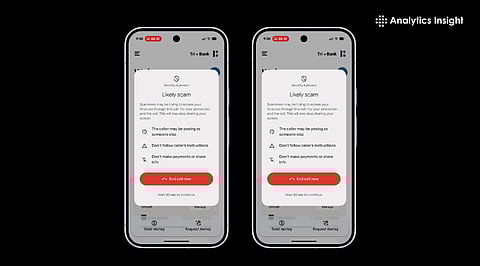
Google has rolled out a major improvement in mobile security with its Android in-call scam protection. The new feature actively monitors when a user is on a call with an unsaved number and tries to open a banking or financial app. If both conditions occur at the same time, the device will display a clear warning and also provide a one-tap option to end the call or stop screen sharing.
This immediate action interrupts the regular operation of numerous scams where scammers pretend to be banks or payment services and request the user make a transaction or disclose sensitive information.
When a call arrives from an unknown number, and if the user attempts to launch a supported financial app or share their screen, Android activates the new scam protection alert.
The alert gives two quick choices: end the call or stop screen sharing. If the user proceeds, an enforced 30-second pause slows down any hurried or panic-driven response often induced by scammers. According to Google, the pause is deliberate: it breaks the “urgency illusion” that scammers often create.
This scam protection is available on Android devices running version 11 and above. In India, the rollout partners include popular financial apps like Google Pay, Paytm, and Navi. Android’s broader scam detection suite also monitors messages and app installations to identify phishing or malware.
Users should note that the feature may depend on the default call app and region; as Google describes, it might not be enabled on all devices immediately.
Older protection methods on Android focused mainly on blocking spam calls or detecting malicious apps after installation. The new “in-call scam protection” adds context-aware safeguards: it watches for risky combinations of a call plus usage of financial apps or screen sharing and intervenes at the moment fraud can happen.
This real-time detection is significantly more efficient compared to the reactive blocking method. It counteracts complex social engineering attacks that depend on authority and urgency rather than just suspicious links or numbers.
Also Read: Shield Your iPhone: Must-Have Protection Features
Android’s latest approach to call safety marks a clear shift from simple spam blocking to intelligent prevention. The incorporation of context-awareness provides the users with stronger protection, exactly when threats usually slip through.
As fraud becomes more sophisticated and its communication methods more daunting, this upgrade provides meaningful protection during real transactions. It empowers the users to remain composed, think clearly, and hence, avoid falling into previously unavoidable traps.
1. How to stop scam-like calls on Android?
To block spam calls on your phone, turn on "Filter spam calls." You don't get missed call or voicemail notifications, but filtered calls are in your call history, and you can check your voicemail.
2. What is the anti-scam feature on Android?
The new anti-scam feature will warn you if scammers try to get you to share your screen. Google is expanding Android's in-call scam protection feature to the US. It warns users if they try to open financial apps while screen-sharing on a call with an unknown number.
3. Does Android have a built-in spam blocker?
Spam protection features are built into most Android devices. We should make sure they're switched on in your settings. Google Messages and your Phone app both have spam filters that can block unwanted calls and texts automatically.
4. Can a scammer get into your bank account with your phone number?
Savvy scammers know that by hijacking your mobile phone number, they can assume your identity, intercept security protocols sent to your phone, and gain access to your financial and social media accounts.
5. What is the phone code to stop spam calls?
Use star codes to prevent unwanted calls with the push of a few buttons. Digital phone - press *61. Landline home phone - press *60.
