.png)

Google Tag Manager centralizes all website tags, improving efficiency while reducing manual coding errors.
GTM tracks clicks, scrolls, forms, videos, and downloads for actionable marketing insights.
Seamless integration with Google Analytics enhances data accuracy, supporting agile campaign optimization.
Google Tag Manager is a free system that lets you monitor and deploy marketing tags (code snippets or tracking pixels) on your website (or mobile app) without modifying the code.
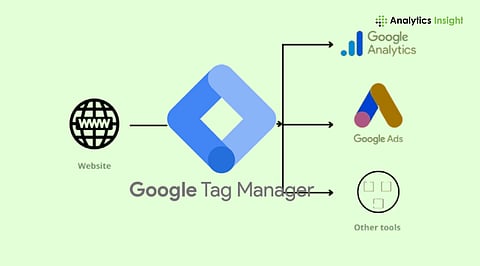
Using Google's Tag Manager, you can allow information from one data source (your website) to be exchanged with another (Google Analytics). GTM is highly useful when working with a large number of tags to manage, since the code is always stored in one place.
Google Tag Manager serves as a centralized hub for managing all tracking codes found on mobile applications and websites. Furthermore, they improve website tracking, promoting efficiency, data accuracy, and more agile campaign optimization.
Users can add marketing tags or code snippets to scale websites and collect marketing data. Without needing to modify the code, it increases the volume and type of information collected. This tool is highly recommended for use alongside Google Analytics.
Also Read: How to Use Google Analytics?
Google Tag Manager is a viable choice in tagging websites and user behavior. Its tracking function helps improve your business activities. The standard features include:
Scrolls: The Tag Manager can determine the audience’s scrolling activity across your website and other related pages. By visiting and interacting, one can gain valuable insights into all of its activities. The scrolling data is well-organized, helping develop strategies to improve the website’s user experience.
Click: Tracking website clicks on specific links supports generating vital information for your website’s processes. Conversions will be created based on links such as call-to-action buttons and page refreshes.
Forms: Form submission is highly recommended for any business website looking to capture user information. It could be a quiz, a newsletter, or even a simple event registration.
Videos: Videos raise popularity and improve consumer engagement. It also captures data such as watch time, views, likes, and comments.
Downloads: Downloadable content is widely available on various websites, boosting user engagement on your websites. Google Tag Manager download engagement can aid businesses with data collection for actionable insights.
Google Tag Manager improves website operations and efficiency while ensuring accuracy on a user-friendly interface. It also enhances your website's flexibility and performance through gathered data. Following this aspect helps improve your strategies by tracking information across websites.
What is Google Tag Manager and how does it work?
Google Tag Manager is a free tool that allows you to work on website tags and track codes without needing direct edits.
How does Google Tag Manager improve website tracking?
It centralizes all tags, tracks user actions like clicks, forms, videos, and downloads, and ensures accurate data collection for marketing or analytical purposes.
Do I need coding knowledge to use Google Tag Manager?
No coding knowledge is required. GTM provides a user-friendly interface for adding, updating, and managing tags without having to modify the website’s source code.
Can Google Tag Manager integrate with Google Analytics?
Yes, GTM integrates seamlessly with Google Analytics, allowing you to track website performance, user behavior, and conversion data efficiently.
What are the main benefits of using Google Tag Manager?
GTM increases productivity, improves data accuracy, simplifies tag management, supports agile marketing campaigns, and builds your website’s performance without needing constant developer support.
