.png)

Personalized coffee printing can help cafés, hotels and event companies turn ordinary drinks into memorable branded experiences. Evebot coffee printers use food-grade edible ink to print photos, logos, messages and custom designs directly onto coffee foam and other stable food surfaces.
In this Evebot coffee printer review, we compare the EB-FC1 and EB-Pro based on print quality, speed, ease of use, ink safety, operating costs and maintenance. The EB-FC1 is better for multicolor images and personalized designs, while the faster EB-Pro is more suitable for high-volume service and single-color logo printing.
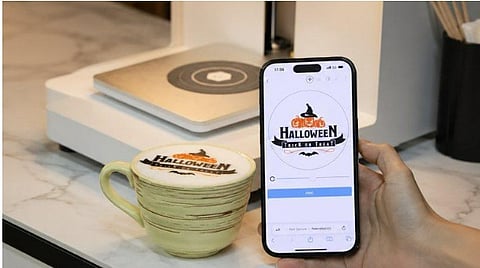
The Evebot coffee printer is a commercial beverage-surface printer designed to print edible patterns onto coffee foam and other stable food surfaces. Unlike espresso machines, coffee art printers do not brew coffee or froth milk. The beverage must first be prepared by a barista; only once the surface is ready does the printer apply the selected design onto the milk foam.
Businesses can use it to print:
Company logos
Customer photos
Birthday messages
Wedding designs
Seasonal artwork
Promotional slogans
Simple QR codes
Event or sponsor branding
Evebot coffee printers can print on cappuccinos, lattes, beer foam, milkshakes and foamy cocktails, as well as macarons, cookies and biscuits with the appropriate accessory. They are suitable for cafés, hotels, catering companies and branded events.
Choosing between the Evebot EB-FC1 multicolor latte art printer and the EB-Pro depends mainly on whether your business values vibrant full-color art or ultra-fast output. The following review compares their print quality, speed, ease of use, and ideal commercial applications.
Both models can reproduce fine lines, faces, text and business logos on properly prepared drink surfaces. However, printing at 600 DPI on milk foam is different from printing on paper because foam is textured and less stable. Final image quality depends on:
The resolution of the uploaded image
The contrast and complexity of the design
The consistency of the foam
The distance between the nozzle and the drink
The condition of the ink cartridge
Bold logos, clean text and high-contrast portraits generally deliver the most reliable results. Very small text, fine gradients and low-contrast images may lose some detail. In our test, the same design was printed 10 times, with all 10 prints producing clear and usable results.
The EB-FC1 takes approximately 20–40 seconds per print, making it suitable for personalized orders where customers value full-color photos and artwork. The EB-Pro completes a print in approximately 5–15 seconds, making it a better option for hotel breakfasts, conferences, busy cafés and other high-volume environments.
Actual service time will be longer because it also includes preparing the drink and foam, selecting the image, positioning the cup and removing the finished beverage.
Both models are designed for straightforward operation, so employees do not need advanced latte art skills to print a recognizable photograph or logo. New users will still need to learn how to prepare stable foam, position different cups, select suitable images, clean the cartridge nozzle and store opened cartridges properly.
Choose the Evebot EB-FC1 if your café prioritizes colorful photos, branded artwork and shareable social media designs. Choose the Evebot EB-Pro if speed is more important and you mainly need monochrome logos, text or high-volume printing.
The printing process is designed to be straightforward, although the quality of the drink surface remains important.
The coffee should have a smooth, relatively flat layer of milk foam. Large bubbles, uneven foam or a highly curved surface may cause parts of the image to become blurred or distorted.
For the best result, the foam should be:
Fine and dense
Flat across the cup
Free from large bubbles
Stable enough to hold the design
A coffee printer cannot correct poorly prepared foam, so some basic drink-preparation training is still necessary.
Users can select a saved design or upload a custom image such as a photograph, logo or message. Images with clear outlines and strong contrast usually print more reliably than low-resolution photos, pale colors or very complicated gradients.
The cup is placed inside the machine underneath the printhead. Both the EB-FC1 and EB-Pro support cup diameters from 4 to 10 cm and cup heights from 5 to 18 cm. Their automatic cup-height detection reduces the need for manual adjustment and helps maintain a suitable distance between the printhead and the foam.
Once the cup and image are ready, the printer applies edible ink to the foam. The finished design can include text, a logo or a more detailed image, depending on the model and cartridge selected.
Evebot coffee printers use food-grade cartridges specifically developed for printing on drinks and food surfaces. The edible ink is primarily made from food coloring and water, with supporting FDA, SGS and Halal documentation available for relevant products.
For safety and consistent print quality, only compatible food-grade cartridges should be used. The ink has no obvious odor and, in normal printing quantities, does not noticeably affect the flavor of the drink, although individual taste perception may vary. Conventional printer ink and unverified third-party cartridges should never be used on food or beverages.
Note: The ink cartridge has a listed shelf life of approximately 12 months before activation. After activation, it should be used within six months and stored according to the product instructions.
Operating cost is an important consideration because the machine price is only part of the total investment.
The listed cartridge yield is approximately:
800 prints for an EB-FC1 cartridge
1,000 prints for an EB-Pro cartridge
Using a cartridge price of $89 as an example, the estimated ink cost is:
EB-FC1: $89 ÷ 800 = approximately $0.11 per print
EB-Pro: $89 ÷ 1,000 = approximately $0.09 per print
These are estimates rather than guaranteed costs. Large designs, heavy color coverage, nozzle cleaning and test prints can reduce the actual yield.
If a café charges an extra $2 and sells 10 personalized drinks daily, the investment could pay for itself in approximately 3 months. A hotel charging $3 for 15 customized drinks daily could recover the cost in about 6 weeks, while an event company charging a $200 personalization fee could break even after around 10 events.
600 DPI printing resolution
Multicolor printing available with the EB-FC1
Faster 10–15-second printing available with the EB-Pro
No advanced manual latte art skills required
Suitable for photos, logos, messages and event designs
Automatic cup-height detection
Supports real-time selfie uploads.
Estimated ink cost from approximately $0.09 to $0.11 per print
Can support branded events and personalized customer experiences
Can print on selected foods with compatible accessories
Print quality depends heavily on foam preparation
Low-resolution images will not produce sharp prints
Cartridge nozzles require inspection and occasional cleaning
The 13 kg machine is transportable but not ideal for frequent hand carrying
These limitations do not necessarily make the machine unsuitable. They help determine whether the product matches a business’s workflow and expected order volume.
An Evebot coffee printer is most valuable when drink personalization contributes directly to revenue, marketing or the guest experience.
Suitable users include:
Cafés offering customized or seasonal drinks
Hotels providing branded breakfasts and VIP services
Event companies serving weddings and corporate functions
Bars printing sponsor logos on foamy cocktails or beer
Brands organizing exhibitions, launches and pop-up events
Bakeries printing on macarons and icing-covered cookies
A small café that expects to use the machine only occasionally should first estimate monthly printing volume and potential revenue. The machine is easier to justify when personalization is sold as an add-on, included in an event package or used to generate measurable social-media exposure.
Evebot uses food-grade edible ink made primarily from food coloring and water. Supporting compliance and testing documentation is available for the relevant cartridges. Only original or verified compatible food-grade ink should be used on drinks.
The ink has no obvious odor and, in normal printing quantities, should not noticeably change the taste of the drink. Individual taste perception may vary.
Yes. This selfie coffee printer can print photos, real-time selfies, logos, text and custom designs. Clear, high-contrast images deliver the best results.
It can print on lattes, cappuccinos, beer and other drinks with a flat, stable foam layer. Drinks without foam or with a wet, rapidly moving surface are generally unsuitable for direct printing.
Check the cartridge nozzle before use and follow the recommended cleaning procedure if the ink becomes dry or the print develops missing lines. Store activated cartridges correctly, avoid touching the nozzle with sharp objects and use the original power adapter and compatible consumables.
The Evebot coffee printer is a practical investment for cafés, hotels and event companies that regularly offer customized drinks or branded guest experiences. Choose the EB-FC1 for multicolor photos and logos, or the faster EB-Pro for high-volume single-color printing.
Both models require well-prepared foam, suitable artwork and regular cartridge maintenance to deliver consistent results. Explore more Evebot food and drink printers to find the right solution for personalized drinks, desserts and other food-printing applications.
