Best Features of Instagram’s New Edits App

Best Features of Instagram’s New Edits App
Published on
Instagram’s new Edits app brings AI-powered tools that automatically enhance brightness, contrast, and color balance

Instagram’s new Edits app brings AI-powered tools that automatically enhance brightness, contrast, and color balance. It analyzes images and videos, suggesting real-time adjustments that suit the content’s mood. Users can fine-tune details with precision while letting AI do the heavy lifting. The app also includes one-tap enhancements for instant results. Whether you're an amateur or a professional, these AI tools ensure high-quality visuals without complex manual tweaks. By simplifying the editing process, Instagram empowers creators to produce professional-grade content effortlessly, making their posts stand out in a crowded social media space.

The Edits app features an extensive collection of filters and presets designed to give images a distinctive look

The Edits app features an extensive collection of filters and presets designed to give images a distinctive look. From vintage-inspired tones to modern cinematic styles, users can choose from dozens of high-quality presets that match their creative vision. The app also allows for custom filter creation, enabling users to save their favorite edits and apply them across multiple posts for a cohesive feed. Whether you prefer a warm, moody aesthetic or a vibrant, high-contrast style, the Edits app makes it easy to maintain a visually appealing Instagram presence with just a few taps.

For Instagram Reels and Stories enthusiasts, the Edits app includes powerful video editing tools

For Instagram Reels and Stories enthusiasts, the Edits app includes powerful video editing tools. Users can trim, merge, and add seamless transitions between clips to create engaging videos. The app offers slow-motion, speed-up, and reverse effects to add dynamic elements to content. Additionally, built-in stabilization ensures smooth, professional-looking videos without the need for third-party software. With intuitive drag-and-drop editing, users can craft compelling videos in minutes, making it an essential tool for influencers, brands, and content creators who want to enhance their storytelling with high-quality visuals.

Instagram’s new Edits app allows users to overlay text and stickers on photos and videos with advanced customization options

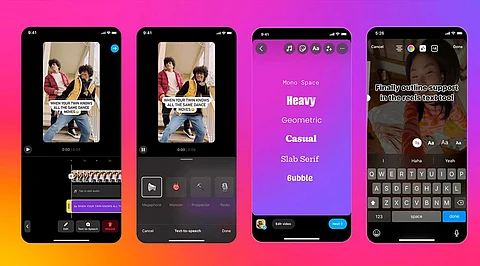
Instagram’s new Edits app allows users to overlay text and stickers on photos and videos with advanced customization options. Choose from various fonts, animations, and colors to create eye-catching captions or highlight important details. The app also supports interactive stickers, allowing for polls, questions, and engagement-boosting elements directly within edits. These features are perfect for brands, businesses, and influencers looking to make their posts more interactive. Whether you’re creating a meme, an infographic, or a fun personal post, the ability to personalize text and stickers makes content more engaging and visually appealing.

The Edits app is designed for seamless integration with Instagram, allowing users to edit content and directly post to Stories, Reels, or Feeds without leaving the app

The Edits app is designed for seamless integration with Instagram, allowing users to edit content and directly post to Stories, Reels, or Feeds without leaving the app. It also supports cloud syncing, ensuring that edits are saved and accessible across multiple devices. Users can start editing on one device and finish on another without losing progress. This cross-platform capability makes content creation more efficient and convenient. The app also allows for scheduled posts, ensuring that users can plan and automate their Instagram content strategy effortlessly, optimizing engagement and reach.

One of the standout features of the Edits app is its AI-powered background replacement and object removal tool

One of the standout features of the Edits app is its AI-powered background replacement and object removal tool. Users can easily swap out backgrounds for aesthetic enhancements or blur them to create a professional portrait effect. Additionally, unwanted objects or photobombers can be removed with a single tap, ensuring clean and polished visuals. This tool is particularly useful for businesses, photographers, and content creators who want to create high-quality, distraction-free images. The AI precision ensures realistic edits, making it one of the most powerful features for enhancing photos on Instagram.

The Edits app offers an extensive library of royalty-free music and sound effects to elevate video content

The Edits app offers an extensive library of royalty-free music and sound effects to elevate video content. Users can browse categories like trending beats, cinematic scores, and ambient sounds to match the mood of their videos. The app also features an AI-powered music recommendation tool that suggests tracks based on the video’s content and theme. Additionally, voiceovers and text-to-speech options allow users to add narration seamlessly. Whether you’re creating an engaging Reel, an informative tutorial, or a fun story, the ability to integrate high-quality audio enhances the overall storytelling experience.

Related Stories

No stories found.
logo
Analytics Insight: Latest AI, Crypto, Tech News & Analysis
www.analyticsinsight.net