.png)

Apple has begun sending out iOS 27 to all iPhones. The update brings a fresh look for Siri, along with a handful of other changes. But quite a few users are facing a confusing issue. They go to install iOS 27, and the phone shows iOS 26.7 instead.
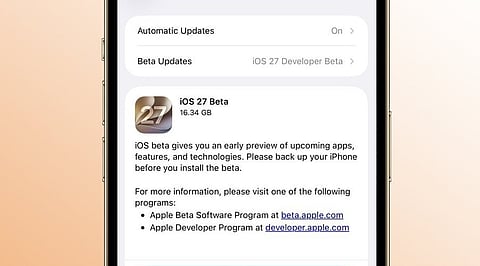
Here's where the mix-up happens. Open Settings and go to Software Update. iOS 26.7 shows up as the main update. iOS 27 is there too, but it's listed under 'Also Available.' Tap on it, and the download screen that opens still says iOS 26.7.
This looks like a glitch in how the update screen is displaying things, not proof that iOS 27 isn't real or isn't rolling out. A few users tried installing iOS 26.7 first, thinking that might clear things up. For some, it didn't change anything. The phone still offers iOS 27 as a choice, but tapping it just loops back to iOS 26.7 again.
One thing worth clearing up: iOS 26.7 isn't a mistake or a placeholder. Apple put it out on purpose, alongside iOS 27, for anyone who wants to stick with iOS 26 while still getting security updates.
Also Read: Apple iOS 27 Update: Why this Could be More Than Just Another iPhone Upgrade
Anyone who wants iOS 27 right away can use a Mac to install it. First, check that the iPhone supports the update. Back up the data too, just to be safe.
Next, connect the iPhone to the Mac with a cable. Open Finder and select the iPhone from the sidebar. Click on General, then choose Check for Update. Finder often shows iOS 27 correctly, even when the phone's own settings do not. Apple is likely to fix the issue soon as the rollout continues. Until then, avoid tapping the same update again and again. Use a Mac if iOS 27 is needed right now, or give Apple some time to sort it out.