.png)

Acer Aspire Lite Ryzen 3 5300U offers a strong specification mix with 8GB RAM and 512GB SSD storage.
Primebook models and ASUS Chromebooks suit students who rely on web-based study tools and online classes.
Refurbished laptops like the Dell Latitude 3500 require careful checks for battery health, warranty, and device condition.
Popular brands such as Dell, Acer, ASUS, and others offer several student laptops under Rs. 30,000. These machines provide enough speed for college work, a clear screen for online classes and plenty of storage for notes, files, and software installation.
The Indian market has Windows laptops, Chromebooks, and Android-based models, with each one suitable for a different kind of work. Choosing the right one depends on the course and the software it requires.
Acer Aspire Lite with the AMD Ryzen 3 5300U stands out for its mix of processor and storage. It comes with 8GB RAM, a 512GB solid-state drive (SSD) and a 15.6-inch Full HD screen. Windows 11 means students can run the usual desktop apps for documents, spreadsheets, presentations and basic coding.
The Ryzen 3 5300U is a stronger starting point than many entry-level Celeron chips. Its Radeon integrated graphics handle everyday visual tasks, though this laptop is not meant for serious gaming or heavy video workflows. Students who want a regular Windows computer can consider it.
Acer Aspire 3 with the Intel Celeron N4500 is for students who need a basic Windows laptop for daily college tasks. This version has 8GB RAM and Windows 11 Home. The processor is built for simple jobs such as editing documents, web research, email and video classes.
Storage needs a closer look here, since listings may show either 128GB or 256GB of SSD space. That gap matters once large files, course material and software start piling up. The Celeron N4500 is not as quick as the Ryzen 3 5300U, so heavy multitasking may feel sluggish. It still works as an entry-level option for light academic use.
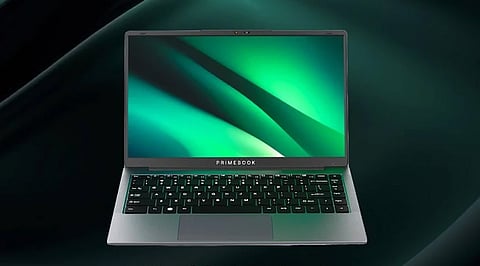
Primebook 2 Pro takes a different route from a standard Windows laptop. It runs on the MediaTek Helio G99 processor with 8GB RAM and 128GB UFS storage. The 14.1-inch Full HD IPS screen is a comfortable size for online classes, reading, and document work, and the listed software is Android 15 with PrimeOS.
It suits students who spend most of the day on web-based tools, video lessons and basic office tasks. Battery life is advertised at up to 14 hours, though real results depend on screen brightness and app use. A major limitation is that PrimeOS does not support desktop software the way Windows does. Some college programs may not run on it, so buyers must consider their course requirements before investing.
Also Read - Laptop RAM: 5 Tasks That Benefit From More Memory
Primebook 2 Neo is a smaller, more basic device for students. It has a MediaTek Helio G99 processor, 6GB RAM, and 128GB storage. The 11.6-inch size makes it easy to carry between home, class, and campus.
Its Android-based PrimeOS handles web research, online lessons, notes and basic study apps. The small screen can feel cramped during long document sessions or when several windows are open, and 6GB of RAM leaves less room for multitasking than the 8GB models here. It makes more sense as a compact study companion than as a full Windows replacement.
ASUS Chromebook with the MediaTek Kompanio 540 processor is aimed at students who work mostly in the browser. The machine offers 4GB RAM, ChromeOS and a 14-inch Full HD screen. The simple operating system fits Google Docs, online research, email, and video lessons well.
ChromeOS handles apps differently from Windows, so software support should be confirmed before buying. The 4GB of RAM also limits heavy multitasking, and many open tabs or demanding web apps can slow things down during long study sessions. For students who use Google Workspace and cloud tools, this Chromebook covers the basics. It is a poor fit for courses that need Windows-only programs or advanced desktop software.
Acer Aspire 3 with the Intel Pentium Silver N6000 is another Windows option. The listed version has 8GB DDR4 RAM, a 256GB SSD and a 14-inch Full HD screen. Windows 11 gives access to common college apps and desktop programs.
The Pentium Silver N6000 is fine for word processing, online research, presentations and video calls. It cannot match newer Ryzen processors, but 8GB of RAM and an SSD make for a more useful setup than many cheap machines with less memory and slower storage. Before buying, check the laptop’s condition, warranty, battery health, and Windows licence, especially if the seller lists it as refurbished or renewed.
Dell Latitude 3500 is a refurbished business laptop for students who want an older Intel Core i5 processor. The listed setup has an 8th-generation Core i5 chip, 8GB RAM and a 128GB SSD. Its business-class build gives it a different character from low-cost entry-level laptops.
The Core i5 can manage everyday office work, web research and basic programming. Its age counts against it, though. The 128GB SSD leaves little room for large files, and battery health can differ vastly if its a refurbished unit. Buyers must check the screen, keyboard, ports, battery, charger, warranty and refurbishment grade before making a purchase.
Also Read - 7 Features to Know About LG's 17-Inch Gram Max Laptop
On paper, the Acer Aspire Lite with Ryzen 3 5300U looks like the strongest choice for students who need Windows, 8GB RAM and 512GB of SSD storage. Primebook 2 Pro is a useful alternative for web-based study, and the ASUS Chromebook suits students who rely on Google tools. Dell Latitude 3500 may appeal to buyers who prefer a refurbished business machine, as long as its condition and warranty hold up.
At this price, the processor, storage, operating system and warranty deserve equal weight. A cheap laptop can cover basic college needs, but the wrong software platform or a weak processor can cause trouble later. Checking the exact model and seller details helps students get better value from a Rs. 30,000 budget.
1. Which is the best student laptop under Rs. 30,000?
The Acer Aspire Lite with AMD Ryzen 3 5300U stands out for its 8GB RAM, 512GB SSD, and Windows 11 setup.
2. Is 8GB RAM enough for college students?
Yes, 8GB RAM can handle everyday academic tasks such as document edits, web research, presentations, and online classes.
3. Are Primebook laptops suitable for college students?
Yes, Primebook models can suit students who use web-based tools, online lessons, and basic study apps. However, some Windows-only software may not run on PrimeOS.
4. Is a Chromebook a good choice for students?
An ASUS Chromebook can suit students who rely on Google Docs, email, browser-based research, and online classes. Its ChromeOS system has different software support from Windows.
5. Should students buy refurbished laptops under Rs. 30,000?
Refurbished laptops can offer useful processor performance at a lower price. However, battery health, warranty, screen condition, storage, and seller reliability need careful checks.