.png)

The clearest dividing line in smart glasses is not price or brand. It is whether the device has to power a display, and that decision drives battery life, comfort and cost.
Manufacturer battery claims and independently tested active-use numbers use different measurement methods. They should not be read as directly comparable.
The right purchase depends on matching hardware to actual daily workload, not on chasing the longest spec sheet.
Smart glasses fall into two broad categories. Audio-plus-camera glasses are built for everyday AI assistance. Display-equipped glasses are built to show visual information. That single distinction matters more than brand or price.
A display changes how much power the device draws. It changes how much the device weighs, and it changes how long a charge lasts. Buyers who understand this before comparing spec sheets get a much clearer sense of what they are actually choosing.
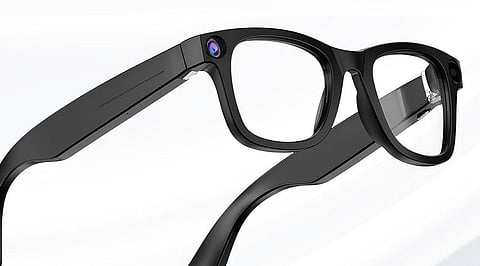
The market broadly divides into two categories. Audio-plus-camera glasses carry no screen. They capture photos and videos and they respond through built-in open-ear speakers. Display-equipped glasses add a screen inside or over the lens for notifications, captions, or navigation.
Some of these are true AR glasses with spatial overlays. Others sit closer to a heads-up notification layer, so the two terms are not interchangeable. A buyer choosing between these two categories is choosing a use case first, not a brand.
Camera resolution has moved fast in the past year. Meta's Ray-Ban Gen 2 now shoots 3K video at up to 60 frames per second, up from 1080p on the prior generation. Display quality varies more than camera specs suggest.
Meta's Ray-Ban Display pairs a 20-degree in-lens overlay with a wrist-worn Neural Band that reads muscle signals for cursor control. Even Realities' G1 takes a simpler approach, using a monochrome micro-LED waveguide built mainly for notifications and live translation across 13 languages. Weight and heat matter as much as either spec.
A device that gets warm or heavy after an hour rarely gets worn past the first week. Voice assistant quality and app lock-in matter just as much as the hardware. Switching brands can also mean moving to a different companion app, a different AI service, and a different feature set, so the software commitment is part of the purchase decision.
Power demand rises in a clear order. Audio comes first, then camera use, then AI processing, then display, then continuous display paired with AI. Many current audio-plus-camera glasses advertise roughly six to eight hours of use. Actual endurance still depends heavily on the camera, AI, and calling workloads.
Rokid's model claims up to 12 hours on a single charge. Display glasses tell a different story. Independent testing on the Meta Ray-Ban Display recorded the battery dropping to 40 percent after roughly 90 minutes of active screen use. XREAL's One Pro offers around three hours with the display running continuously.
The battery gap comes down to workload more than battery capacity. Playing audio draws far less power than running a display alongside a camera and AI processing at the same time. That is why display glasses lose charge several times faster, even with a similar-sized battery.
The table below mixes manufacturer claims with one independent test result. The two figures do not measure the same thing and should not be read as equivalent benchmarks.
*Prices are approximate USD-to-INR conversions of manufacturer MSRP as of August 2026. They exclude GST and do not reflect Indian retail availability or import duty. Current pricing should be verified directly with the retailer before purchase.
Privacy risk comes from three places. The first is what gets recorded. The second is where that recording gets processed. The third is how long it gets retained.
Most current models include a small LED recording indicator, but that indicator only signals awareness. It does not signal consent from bystanders caught in the frame. Buyers should check whether captured images, voice interactions, and AI queries get processed on-device, get sent to cloud services, get retained, or get used to improve the service.
These policies differ by product and change independently of the hardware. The privacy policy deserves the same scrutiny as the spec sheet.
Also Read: Ultimate Motorcycle Dash Cam Buying Guide
Fitness and outdoor use: Audio-only glasses with a strong IP rating are the better fit. A display adds weight and drains the battery faster than most active sessions require.
Calls, meetings, translation, and general hands-free AI: Audio-plus-camera glasses often suit professional use just as well as display models, thanks to longer runtime and simpler design.
Work centered on visual prompts, captions, or navigation: Display glasses earn their place here, not as a default upgrade for anyone at work, but for tasks where visual information sits at the center of the workflow.
Casual, everyday use: Entry-level audio-plus-camera glasses fit best. They balance battery life, weight, and price better than any display model currently on the market.
Also Read: Kindle or Kobo? The Ultimate eReader Buying Guide for 2026
The best smart-glasses purchase in 2026 is not the model with the longest feature list. It is the one whose hardware matches the workload it will actually carry. Audio-plus-camera glasses remain the practical choice for everyday AI calls and capture. Display glasses earn their extra weight and shorter runtime only when visual information sits at the center of the task.
1. What should you look for when buying smart glasses in 2026?
Focus on the intended use case first, then compare battery life, camera or display quality, privacy controls, comfort, prescription support, smartphone compatibility and the supporting AI ecosystem.
2. What is the difference between AI smart glasses and AR glasses?
AI smart glasses generally focus on cameras, audio and voice-based assistance, while AR glasses use displays to present digital information, visual overlays or virtual content within the user's view.
3. How long does smart glasses battery life last?
Battery life varies by device and workload. Audio-plus-camera glasses can generally last longer than display-equipped models, while continuous camera, AI and display use can reduce active runtime significantly.
4. Are smart glasses a privacy concern?
Yes. Buyers should consider what the glasses record, where captured data and AI interactions are processed, how long information is retained, and whether the device clearly indicates when its camera is recording.
5. Are smart glasses worth buying in 2026?
They can be worthwhile when their capabilities match a regular use case. Audio-plus-camera glasses suit everyday AI, calls and capture, while display models make more sense when visual information is central to the user's workflow.
