.png)

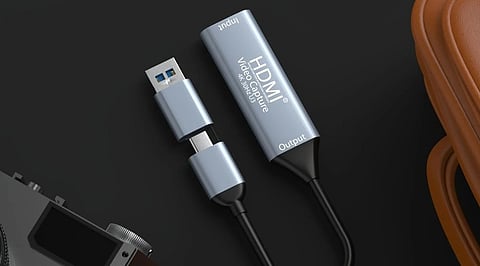
A capture card transfers external video signals from consoles, cameras or computers into streaming and recording software.
Capture resolution, pass-through, HDR, VRR and interface type are key specifications when comparing different capture card models.
External USB cards suit portable setups, while internal PCIe models offer higher bandwidth for demanding desktop streaming configurations.
Streaming and content creation have grown into a serious hobby for many gamers, and a capture card sits at the center of that setup. It takes a video signal from a console, a camera, or a second computer and hands it to your streaming PC in a form that software such as OBS can read. Without one, console streamers and camera users have limited options for building a polished broadcast.
This guide breaks down what a capture card does, the specifications worth checking, and which model suits different needs.
A capture card is a small device that takes an external video signal, usually delivered through HDMI, and converts it into a format your PC can use. It sits between the source (a PlayStation, an Xbox, a Nintendo Switch, or a DSLR camera) and your computer.
Also Read: Sony PlayStation Games Are Licensed, Not Owned: 2028 Shift
Three Tasks Happen Inside the Device:
It locks on to the incoming HDMI signal.
It converts that signal into a format Windows or macOS recognizes as a video device.
It sends a second copy of the picture out through a pass-through port, so a monitor or television displays the same feed with almost no delay.
Streaming platforms such as Twitch and YouTube buffer footage for a few seconds anyway, so the small delay a capture card introduces on the recording side never reaches the audience.
Not every content creator requires a capture card. A single-PC streamer running games and OBS on the same machine already has everything needed through the graphics card. A capture card matters most in these situations:
Console streaming with overlays- PS5 and Xbox both offer built-in streaming apps, yet neither supports alerts, scenes, or a webcam overlay without routing footage through a PC.
Camera-based setups- A DSLR or mirrorless camera with clean HDMI output can replace a standard webcam once a capture card converts its signal.
Two-PC streaming-Serious streamers often use a second computer purely for encoding, feeding gameplay footage from the gaming PC into a capture card on the streaming PC.
Multi-source production- Podcasts and interview-style shows that combine several cameras rely on capture devices to bring every feed into one program.
Capture cards generally fall into two categories, and the choice between them shapes the rest of a buying decision.
External USB models connect through a USB-A or USB-C port. They work with laptops, handheld gaming PCs, and desktops alike, and most travel easily to events or LAN parties. Setup takes minutes, and many models need no separate driver.
Internal PCIe cards fit inside a free slot on a desktop motherboard. Installation takes more effort, and the card stays tied to that one machine, though the payoff is lower delay and higher sustained bandwidth for demanding 4K or high-refresh footage.
Marketing pages often use the term ‘4K’ loosely, so it helps to separate the numbers before comparing products.
Capture resolution- The quality that actually reaches your recording software. Twitch downscales anything above 1080p60, so a higher figure benefits YouTube archives and offline editing far more than live streaming.
Pass-through resolution - The quality sent to your monitor or television, which can sit far above the capture figure.
HDR support - Useful for console gameplay, though most live platforms display standard dynamic range only, so a card with proper HDR-to-SDR conversion avoids a washed-out picture.
Variable Refresh Rate (VRR) - A card without VRR pass-through disables that feature across the entire chain, including a gaming monitor that supports it.
Interface type - USB 3.0 handles 1080p60 comfortably, USB 3.2 Gen 2 supports higher frame rates at 4K, and PCIe delivers the highest sustained throughput available.
A sensible approach starts with the source device and the target platform, then works toward a model.
Budget console streaming- A compact 1080p60 card with solid HDMI pass-through covers most Twitch or YouTube broadcasts without overspending on features that a live platform cannot display anyway.
Camera as a webcam- A simple USB stick that supports UVC (USB Video Class) plugs into a PC and appears instantly as a webcam source, with no driver installation required.
Competitive or high-fidelity streaming- A card with 4K capture, HDMI 2.1 pass-through, and VRR support suits players who record locally in high quality or run a two-PC rig.
Travel and events- A lightweight external unit that also charges a handheld device works well for creators recording footage away from a desk.
A few recurring errors lead buyers toward the wrong purchase:
Confusing pass-through numbers with actual capture quality on the box.
Choosing an unbranded, very cheap dongle that compresses colour heavily and drops frames under load.
Skipping HDR or VRR support and later finding a console's picture quality drops on the connected monitor.
Buying an internal card for a laptop, where installation is simply not possible.
Forgetting that a PS5 needs HDCP switched off in its settings before any capture software detects a signal.
Choosing a capture card comes down to matching the device to the actual source and platform rather than chasing the highest number on a spec sheet. A modest 1080p60 external unit covers most console streamers comfortably, while a PCIe card with HDMI 2.1 support rewards creators who need the highest possible fidelity for recording or a two-PC rig. Reading the pass-through and capture figures separately, checking HDR and VRR support, and confirming the right interface for a given PC prevents a costly mismatch and leads to a setup that performs reliably for years.
1. What does a capture card do?
A capture card receives video from a console, camera or another computer and sends it to streaming software such as OBS. It can also provide pass-through video to a monitor or television.
2. Do I need a capture card for streaming?
A capture card is mainly useful for console streaming, camera-based broadcasts, two-PC setups and multi-source production. Single-PC gaming streams generally do not require one when the computer handles gameplay and encoding.
3. What capture card should I buy for PS5 or Xbox?
For PS5 or Xbox streaming, a 1080p60 capture card with reliable HDMI pass-through is sufficient for many creators. Higher-end models are useful for 4K recording, HDR, VRR and HDMI 2.1 setups.
4. What is the difference between capture and pass-through?
Capture resolution determines the video quality delivered to your computer and recording software. Pass-through resolution determines what reaches your monitor or television, so the two specifications should be compared separately.
5. Is an external USB or internal PCIe capture card better?
External USB capture cards offer easier installation and portability across laptops and desktops. Internal PCIe models suit permanent desktop setups that need higher sustained bandwidth, lower preview delay and advanced high-resolution capture capabilities.
