.png)

Learn how a teleprompter improves eye contact, presentation confidence, and overall video quality across YouTube, webinars, interviews, and corporate recordings.
Compare leading teleprompter models based on compatibility, portability, display quality, remote control, and suitability for different recording environments.
Discover practical buying considerations to select a teleprompter that matches your budget, workflow, recording setup, and long-term content creation needs.
In today's digital world, anyone with a smartphone can share their thoughts online. However, speaking naturally on camera without notes takes practice. Many influencers, content creators, hosts, and professionals rely on scripts to deliver their message smoothly. A teleprompter solves this problem by displaying the script in front of the camera lens, allowing presenters to read while maintaining direct eye contact with the audience. The result is a more confident delivery, steady eye contact, and a polished presentation.
The right teleprompter has a direct effect on how a presenter comes across on screen, whether the setting is a YouTube studio, an online meeting, or a professional video shoot. This guide outlines what matters most in choosing one, along with a comparison of the leading models available today.
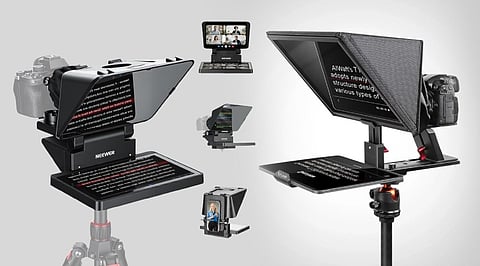
A presenter who looks down at notes or glances sideways at a script loses connection with the audience. A teleprompter fixes this through a simple trick of optics. Your script scrolls on a screen, usually a phone or tablet, and reflects onto a piece of angled glass called a beam splitter. This glass sits in front of the camera lens. You read the reflected text while the camera lens stays in view, so eye contact looks completely natural.
YouTube videos and vlogs, where consistent delivery keeps viewers engaged
Online meetings and webinars, where reading and talking points smoothly build trust
Corporate presentations, product demos, and training videos
Professional shoots such as interviews, commercials, and broadcast-style content
Also Read: Best Cameras for Content Creators & YouTubers in 2026
Choosing a teleprompter is not just about price. A few factors decide how well it fits your workflow.
Screen Size and Reading Distance: A larger glass panel is easier to read from a distance, giving your delivery a relaxed pace. A smaller unit works fine for close-up desk setups but can feel cramped for larger scripts.
Glass Quality: Beam splitter glass is the heart of the device. Good glass, usually rated 70/30, reflects text clearly without adding haze or distortion to the camera image.
Device compatibility: Check whether the unit supports your phone, tablet, laptop, or camera setup. Some models fit only smartphones, while others handle DSLRs, mirrorless cameras, and larger tablets.
Portability: Creators who travel or record on location benefit from foldable, lightweight designs that pack into a small bag.
Remote control and app support: Bluetooth remote lets you control scroll speed without touching the device mid-recording, which keeps your delivery smooth.
Also Read: Top 10 Sustainable Camera Brands Leading the Industry in 2026
For YouTube Creators: The Glide Gear TMP 100 covers most needs, handling everything from smartphones to DSLR cameras with long lenses. Its reading range of up to 10 feet gives room to move and speak naturally.
For Online Meetings/Webinars: Elgato Prompter is suitable for desktops. It does not require any external device since it has its own screen and is compatible with all video conferencing software through its webcam/camera. As for lightweight teleprompters, Glide Gear TMP 75 can be fixed to a laptop; therefore, you do not have to take your eyes off your webcam during the conversation.
For Professional Video Production: Teleprompters with great build quality and versatile compatibility with different devices such as Neewer X14 III and Desview T3 are suitable for production sets. Both models have Bluetooth remotes enabling the user to control the scroll speed while presenting.
For Beginners or Limited Budget: Ambitful Teleprompter Kit and Glide Gear TMP 50 will suit as budget-friendly options. Though they miss many advanced options of expensive teleprompters, they perform all essential functions properly.
Glide Gear TMP 100 - Check Latest Price
Elgato Prompter - Check Latest Price
Neewer X14 III - Check Latest Price
Desview T3 - Check Latest Price
Ambitful Teleprompter Kit - Check Latest Price
Glide Gear TMP 50 - Check Latest Price
Glide Gear TMP 75 - Check Latest Price
A teleprompter is one of the simplest upgrades a presenter can make. It turns a hesitant, note-checking delivery into something confident and clear. For frequent YouTube uploads, a versatile model like the Glide Gear TMP 100 offers strong value. For daily online meetings, a screen-equipped option like the Elgato Prompter or a laptop-mounted unit like the TMP 75 saves setup time. For larger productions, models with sturdy builds and wide compatibility, such as the Neewer X14 III, hold up across repeated use.
Match the teleprompter to your actual workflow rather than chasing the most expensive option. A well-suited, budget-friendly model often performs better in daily use than an advanced one that does not fit your setup.
1. What is a teleprompter, and how does it work?
A teleprompter reflects scrolling text onto beam splitter glass positioned in front of a camera lens. Presenters read the script while maintaining direct eye contact, creating a more natural, confident, and professional on-camera appearance.
2. Which teleprompter is best for YouTube creators?
For most YouTube creators, the Glide Gear TMP 100 offers excellent versatility supporting smartphones, tablets, and DSLR or mirrorless cameras, making it suitable for both home studios and professional recording setups.
3. Can I use a teleprompter for online meetings and webinars?
Yes. Models like the Elgato Prompter and Glide Gear TMP 75 help presenters maintain eye contact during virtual meetings, webinars, interviews, and online presentations while reading prepared talking points naturally.
4. What should I consider before buying a teleprompter?
Consider screen size, beam splitter glass quality, compatibility with your devices, portability, Bluetooth remote support, and your typical recording environment to ensure the teleprompter fits your content creation workflow.
5. Are budget teleprompters worth buying?
Budget teleprompters provide essential functionality for beginners, students, and occasional creators. While they may lack premium features, they still improve script delivery, eye contact, and presentation confidence at an affordable price.
