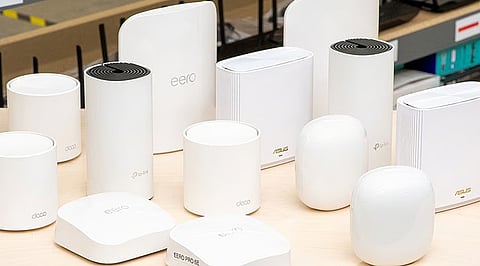
.png)

Mesh Wi-Fi systems create a single, seamless wireless network by using multiple nodes to eliminate dead zones and deliver stable connectivity across different parts of the home.
TP-Link Deco, Netgear Orbi, and Amazon Eero cater to different needs, offering options focused on affordability, extensive coverage for larger homes, and simple app-based setup.
Coverage area, Wi-Fi standard, band configuration, broadband speed, node placement, and home layout play a greater role in overall wireless performance than simply choosing the newest Wi-Fi generation.
Modern homes run on far more than a laptop and a phone. Smart TVs, security cameras, gaming consoles, and multiple work-from-home laptops now share the same connection, often across two or three rooms at once.
A single router in a hallway cupboard struggles to hold consistent speed across all of that. Dead zones show up upstairs, video calls freeze in the study, and the balcony barely gets a bar.
Mesh Wi-Fi systems solve this by placing several units around the home that work together as one network, handing devices between them as a person moves from room to room.
Amazon India's Whole Home Mesh Wi-Fi Systems section carries the main players worth comparing this weekend: TP-Link Deco, Netgear Orbi, and Amazon eero, spanning Wi-Fi 6 and the newer Wi-Fi 7 generation.
A three-bedroom apartment with concrete walls, for example, usually benefits more from a two-node Wi-Fi 6 mesh system placed at either end of the home than from swapping the ISP router for a single, more powerful standalone unit. Concrete blocks signal in ways one strong router cannot fully compensate for. That is the exact problem mesh solves by design.
Coverage figures come from manufacturer estimates. Actual range varies with wall thickness, floor layout, and interference from neighboring Wi-Fi networks, so treat these numbers as a starting point rather than a guarantee. Exact prices shift often during Amazon sales, so checking the live listing beats relying on any fixed figure.
A few factors matter more than the marketing headline on the box.
Coverage area and number of nodes in the pack.
Wi-Fi standard: Wi-Fi 5 for basic browsing, Wi-Fi 6 for most households, Wi-Fi 6E for dense apartments, and Wi-Fi 7 for homes combining many devices with heavy bandwidth use.
Dual-band versus tri-band design: Tri-band systems dedicate an extra wireless band to either client devices or node-to-node communication, cutting congestion once many devices are active. Dual-band systems cost less but share more bandwidth across everything connected.
Wired backhaul support: Homes with existing Ethernet cabling can connect nodes directly through cable, reducing interference and holding speed steadier at distance.
Broadband plan speed: A Wi-Fi 7 system adds little on a sub-200 Mbps connection, while a gigabit fiber plan benefits from Wi-Fi 6E or 7 hardware that can push those speeds through the home.
Latency, not just download speed: Lower latency matters as much as higher throughput for cloud gaming and video calls, where lag is more noticeable than a slightly slower download number.
Buyers upgrading from a compatible EasyMesh-certified router may want to check whether that support offers a cheaper path than a full mesh kit, since some existing routers can mesh with a single additional unit instead.
Also Read: Top Wi-Fi 7 Routers in 2026 for Ultra-Fast Internet Speeds
TP-Link's Deco lineup dominates the budget and mid-range segments of Amazon India's mesh category.
The Deco M4 three-pack gives far more consistent coverage across a large apartment than a single router ever manages. BUY NOW
The Deco XE75 adds Wi-Fi 6E and the less congested 6GHz band, useful in dense buildings where neighboring networks overlap and eat into available bandwidth. BUY NOW
The Deco BE25 brings Wi-Fi 7 to a price point that suits households buying new rather than replacing an aging setup.
All three include TP-Link's HomeShield app for basic parental controls at no extra cost, with a paid tier for deeper security.
Pros: Strong value, easy setup, and wide coverage per node.
Cons: Full security features sit behind a subscription on higher models.
Skip: If a gigabit fiber connection and top-tier Wi-Fi 7 throughput matter most.
Orbi reserves a separate wireless connection for node-to-node communication instead of sharing that bandwidth with connected devices. This dedicated backhaul helps Orbi hold stronger speeds as distance from the main router increases. Edge systems without a separate channel tend to lose further from the source.
The RBK752 covers up to 5,000 square feet and handles 40 or more devices, fitting larger homes or duplexes. BUY NOW
The RBK50 offers a similar range at a lower cost without the newest standard. The trade-off is size and price: Orbi units run bulkier and pricier than Deco or Eero. BUY NOW
Pros: strongest performance at range, steady speeds across large homes.
Cons: bulkier hardware, higher price.
Skip: If price is the main concern, since Orbi's edge matters most in homes large enough to need the extra range.
Eero's main advantage is not raw speed but how little effort setup requires. The app walks through configuration in minutes, and the system handles firmware updates and self-healing network adjustments on its own.
For buyers who want a mesh system that works reliably without touching advanced settings, Eero remains the most hands-off option available. It trades some of Orbi's throughput at long range for that simplicity, fitting apartments and mid-size homes better than sprawling multi-story houses. BUY NOW
Pros: fastest setup, reliable self-healing network, minimal maintenance.
Cons: fewer manual controls than Deco or Orbi.
Skip it if granular network configuration matters, since eero keeps that layer deliberately simple.
A mesh system underperforms almost as often from poor placement as from a wrong purchase. Nodes should sit midway between the main router and the weak coverage area, not tucked into the corner where signal is already thin.
Most mesh systems also work alongside existing ISP routers from Airtel, JioFiber, ACT, or BSNL. Switching the ISP router into bridge mode, or access point mode where bridge mode isn't available, simplifies network management. It avoids running two competing Wi-Fi networks, rather than directly boosting wireless performance on its own.
Before Buying this Weekend
Confirm whether the listing includes two or three nodes, since the base price often covers only the smaller pack.
Check whether the item is sold and shipped by Amazon or a third-party seller, which affects returns and warranty.
Look for bank card discounts or exchange offers stacked on the listed price during weekend sales.
Coverage area and device count should drive the decision before the Wi-Fi generation on the box does. A typical household of two to four people gets full value from a Wi-Fi 6 system without paying for standards their devices or broadband plan cannot use yet.
Homes under 3,000 square feet usually need only a 2-pack, while larger or multi-story homes benefit from a 3-pack or Orbi's stronger backhaul.
Buying a mesh system that matches the home's layout almost always delivers a bigger improvement than choosing the newest Wi-Fi standard alone. A mismatched system, even at a steep weekend discount, still leaves the same dead zone it was bought to fix.
Also Read: Best Dual-Band and Tri-Band Mesh Wi-Fi Systems Compared for 2026
A mesh Wi-Fi system uses multiple interconnected units to create a single, seamless wireless network throughout the home. Unlike a traditional router, it eliminates dead zones and maintains a stable connection as devices move between rooms.
Not always. A small one- or two-bedroom apartment often gets sufficient coverage from a quality standalone Wi-Fi 6 router. Mesh systems become more beneficial in larger apartments, multi-story homes, or spaces with thick walls that weaken wireless signals.
Wi-Fi 6 is the best choice for most households and broadband plans. It adds access to the 6GHz band, helping reduce congestion in busy environments, while Wi-Fi 7 is best suited for gigabit internet connections and homes with many high-bandwidth devices.
Yes. Most mesh Wi-Fi systems are compatible with broadband connections from Airtel Xstream Fiber, JioFiber, ACT Fibernet, BSNL FTTH, and other internet service providers. They can usually be connected to the existing modem or ISP router, depending on the network setup.
The number of units depends on your home's size and layout. A two-pack is generally suitable for homes up to about 3,000 square feet, while larger or multi-story homes typically benefit from a three-pack to ensure consistent coverage across all areas.
