.png)

NotebookLM turns uploaded documents into conversational AI podcast episodes in minutes.
Audio Overview creates realistic two-host discussions grounded strictly in your sources.
Creators can customize tone, audience, language, and share downloadable audio instantly.
AI audio is now an integral part of our everyday content. Blog posts are being transformed into voice summaries, and research papers are being condensed into brief explainers. If you've ever wondered how to create an AI podcast using NotebookLM, you'll find that the process is simpler than most creators anticipate.
This tool from Google allows you to convert written content into a conversational audio experience in just a few minutes—without the need for a microphone, editing software, or a recording session.
Let’s walk through how to make an AI podcast with NotebookLM and turn almost any topic into a shareable audio format.
Podcasts usually require planning, recording, editing, and distribution. That can take hours or even days. AI audio tools are changing that workflow.
Instead of starting with a microphone, you start with content. A blog post. A research paper. An ebook chapter. Even a YouTube transcript.
An AI podcast with NotebookLM feels less like a robotic summary and more like two smart co-hosts discussing your material. The voices pause, react, and transition naturally. It sounds surprisingly close to a real conversation.
For creators who already write articles or produce research, this opens a new channel without doubling the workload.
Many AI audio tools generate scripts based on general knowledge. That often leads to vague summaries or invented details.
NotebookLM works differently. It relies only on the sources you upload into a notebook. You can add up to 50 items, including:
PDFs
Text files
Google Docs and Slides
Website URLs
YouTube links with transcripts
Because it sticks to your uploaded content, the output is grounded in real material. This reduces factual errors and keeps the conversation focused on your topic.
The feature that stands out is called Audio Overview. It creates a 10 to 15-minute “Deep Dive” discussion between two AI hosts who explore your content in a podcast-style format.
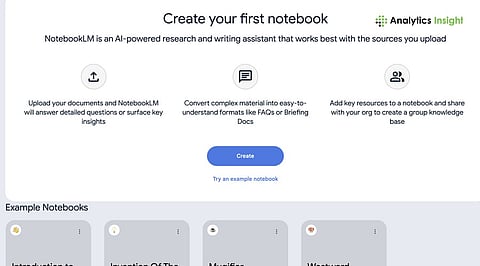
To get started, sign in to NotebookLM using your Google account and create a new notebook.
Think of this notebook as your research folder. Upload the material you want the podcast to cover. If you want a focused episode, make sure all sources relate to the same theme.
For example:
Upload three blog posts about AI marketing tools
Add a research paper on content automation
Include a YouTube interview transcript
The system automatically establishes an order for all content after users complete their upload process. At this stage, you are essentially preparing the raw material for your AI podcast script.
Most content creators are eager to learn how to generate a podcast script with AI.
Open the Studio or Notebook Guide panel and select the Audio Overview option. This triggers the Deep Dive conversation.
Instead of giving you a plain text script, NotebookLM produces a ready-made audio discussion. The AI hosts summarize key ideas, highlight insights, and move between points naturally.
It feels like two co-hosts who read your work in advance and are now discussing it for listeners.
The generation process usually takes just a few minutes. In under 10 minutes total, you can go from raw documents to a complete AI podcast with NotebookLM.
NotebookLM offers ways to shape the experience.
You can adjust tone and format, choosing options like Critique, Debate, or Brief. This changes how the AI hosts interact with your material.
You can also guide the audience level. For example, you might instruct the system to explain concepts for beginners or keep the conversation advanced for professionals.
Language support covers more than 80 languages, making it useful for global creators.
Interactive Mode adds another layer. While listening, you can join the session and ask follow-up questions. The AI hosts respond in context, turning a passive listening experience into a two-way exchange.
You can download the audio file as an MP3 or WAV file after the audio processing is complete. The NotebookLM system lets you create a link that others can use to listen to your work.
The process of repurposing begins with these steps:
Embed the audio in a blog post
Share snippets on social media
Use it as supplementary material for online courses
Turn research into an internal team briefing
Imagine writing a long article and then listening to your own AI-generated podcast version during your commute. That is practical content reuse.
Creating an AI podcast with NotebookLM is not about replacing human podcasters. It is about expanding how written ideas can travel.
As AI audio tools continue to improve, creators who already produce research, blogs, or educational content have a great opportunity. Instead of starting from scratch, they can turn existing knowledge into conversational audio in minutes.
1. Is it difficult to create an AI podcast with NotebookLM?
Not at all. If you can upload a document and click a button, you can create one. The interface is simple, and the audio generates automatically within minutes.
2. What kind of content works best for an AI podcast with NotebookLM?
Focused content works best. Blog posts, research papers, ebooks, or related articles on one theme help the AI hosts create a clear, natural conversation.
3. How accurately does NotebookLM generate the podcast?
It stays grounded in the sources you upload. Since it does not pull random internet data, the discussion usually reflects your material closely and avoids made-up details.
4. Can I control how the AI hosts sound or behave?
You cannot fully customize voices, but you can guide tone and format. Options like Debate or Brief shape how the hosts discuss your content.
5. Can I download and reuse the AI podcast elsewhere?
Yes. Once generated, you can download the audio file and share it anywhere. Many creators embed it in blogs or repurpose clips for social media.
