.png)

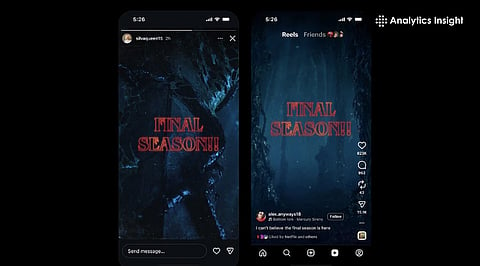
Social media aesthetics evolve constantly, and Instagram has taken the excitement to another level by introducing a Stranger Things–themed text style for Stories and Reels.
Designed to mirror the series’ dark, neon-red retro typography, this themed font gives users a way to take part in Season 5 hype with a unique supernatural twist.
Whether you’re a fan of the Netflix series, someone who loves horror aesthetics, or a creator planning a watch-party announcement, this font makes your content instantly recognizable.
The Stranger Things franchise has always evoked nostalgia and suspense. Recently, Instagram users have found a creative way to make this classic franchise more popular by replicating its eerie 80s-style lettering. Previously, it was not impossible, but it required graphic-design apps or templates. However, Instagram has now bridged that gap by integrating two versions of the theme font directly into the platform.
This special update has brought two Stranger Things typography modes: one thick and bold like the official logo, and another outline-style text similar to the show’s intro animations. Both styles cover a red glow which is perfect for Halloween-style edits, and meme or reels.
Before you jump into the steps, it’s important to know whether the theme is the right fit for your content or not.
The Stranger Things font helps transform regular Stories and Reels into cinematic, themed posts with minimal effort. Particularly created for hardcore fans of the show, the Instagram fonts combine spooky visuals, retro aesthetics, red color grading with synth-music edits.
The text style also improves post engagement because themed fonts look better than standard typography. For creators who release episode breakdowns, fan edits, watch-party invites, countdown announcements, reaction reels, or montage videos, the Stranger Things style provides them with instant reach and engagement.
Also Read: Top 10 Entertainment Apps Dominating 2025: Must-Haves!
The process is extremely simple and doesn’t require extra apps. To begin with the process, one must open Instagram, and create a Story or Reel. Tap the ‘+’ sign and select Story or Reel to start a new post.
The next step includes tapping on the text icon to type your content. Swipe through the font list until you find the Stranger Things-themed styles. You can either go for a bold logo-like font or the outline version. There’s another step that you can also go for and that’s to activate the glowing effect for a darker, supernatural look.
Finally, when you’re complete with the decoration of the post, your Story or Reel will carry the Stranger Things aesthetic. Currently, the feature is available worldwide and runs directly inside Instagram, and doesn’t require paid subscriptions.
Also Read: Best 65-Inch TVs to Buy For Unlimited Entertainment
The themed font enhances the appeal of every post with storytelling, suspense, nostalgia, and horror vibe. With creators who prefer minimal, soft-tone, or professional aesthetics might find the glowing effect too strong for everyday content.
The style is ideal for those who are hardcore Stranger Things fans or fan-community members. Similarly, if you are someone who posts show breakdowns, memes, watch-party announcements or countdowns, the Stranger Things font will bring them large engagement.
However, if you’re a business-focus person who shares business-related posts and reels, or handles professional branding pages, you have to make things look professional. In that case, the Stranger Things theme won’t work.
Therefore, if you’re planning Stranger Things content or simply want to experiment with the viral font trend, you have to do it based on what kind of posts you handle. Your work on Instagram will decide whether you should use it or not.
However, it is better to grab the opportunity now. The font may be removed anytime from Instagram. In that case, if you are a Stranger Things fan and don’t want to miss the chance, go for it soon or else you may miss the chance.
Where can I find the Stranger Things font on Instagram?
Ans: The Stranger Things fonts are available in the Instagram Stories/Reels Text Tool. To find these themed font options, open the text tool and look through the list of available fonts until you see Stranger Things.
Do I need any third-party apps to use the Stranger Things text style?
Ans: The Stranger Things font styles do not require any third-party applications for use. The Stranger Things font styles are built into Instagram currently, so no additional app or external resources are necessary to create artworks featuring these fonts.
Are both versions of the Stranger Things font available worldwide?
Ans: The Stranger Things font styles are available globally through Instagram's rollout of the themed fonts. The Stranger Things font styles will work on both iOS and Android-based mobile phones.
Who should use the Stranger Things font for their content?
Ans: That's perfect for the series' followers, and creators can post breakdowns, memes, countdowns, watch-party alerts, and cinematic edits with a creepy or retro atmosphere.
Is the Stranger Things font suitable for professional or business content?
Ans: Not necessarily. The glowing, retro-horror style might not fit in with the professional brand identity. It is most effective for posts that are themed, entertainment-oriented, or aimed at fans.
