.png)

When I first considered installing a smart doorbell, I assumed connecting it to my phone would be enough. However, this became inconvenient whenever I was in a meeting, travelling or unable to check an alert immediately.
Other family members could hear someone at the entrance, but they could not view the visitor or respond through their phones. I realised that a video doorbell becomes much more useful when everyone responsible for the home can receive alerts.
After a bit of research, I figured out the solution. All I had to do was to configure the doorbell on one primary phone and share access with other household members. Here is how you can set up a similar arrangement.
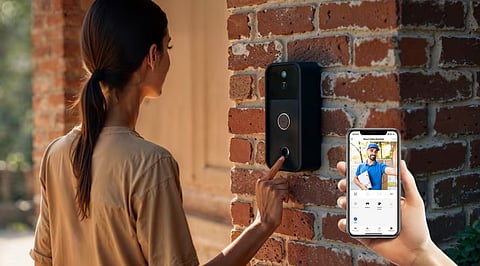
A conventional calling bell only informs people who can physically hear it. A video doorbell can also let authorised household members see who is outside and communicate with visitors through their phones.
Restricting these functions to one person limits their usefulness. I might miss an alert while working, but another family member could still respond to a delivery. If nobody was home, an authorised person could remotely check who was at the entrance.
Giving multiple people access therefore made the doorbell part of our broader smart home security setup instead of leaving it under the control of one person.
As more household devices become connected, brands such as Wipro Consumer Lighting are expanding beyond lighting to offer integrated smart-home security solutions. Products such as the Wipro Smart Wi-Fi Video Doorbell Pro are designed to help households monitor and manage their entrances through a connected app.
The first step was to install the doorbell and connect it to a primary smartphone. This phone served as the main device for creating the account, adding the doorbell and managing access for other users.
The Wipro Smart Wi-Fi Video Doorbell Pro can be managed through the Wipro Next Smart Home app. Wipro also states that multiple family members can access the smart doorbell through the app.
It may appear easier to use the same account and password on every phone. However, sharing the primary login can make access difficult to manage and may create unnecessary security concerns.
Instead, I used the app’s device-sharing or household-access feature. Depending on the current app version, the exact name and location of this option may differ.
The process generally involves opening the doorbell in the app, entering its settings and selecting the available sharing option. The primary user can then invite another household member through the account details requested by the app.
Using the official sharing function means each person can access the device through an individual account without knowing the password of the primary user.
Each person who needed doorbell access installed the Wipro Next Smart Home app on their phone. They then created an account or signed in and accepted the invitation sent by the primary user.
Once the shared doorbell appeared in the app, we checked whether each person could:
Receive a doorbell alert
Open the live video feed
View the entrance
Use the available communication controls
The Wipro Smart Wi-Fi Video Doorbell Pro features a 3 MP 1296p Full HD camera and night vision. Its connected functions allow authorised users to see and communicate with visitors through their phones.
These capabilities are particularly useful in households where different people may be responsible for answering the entrance at different times.
Sharing access does not always guarantee that every phone will produce an alert. Notifications must also be enabled through the app and the settings of each phone.
On every device, I checked that:
App notifications were enabled
Doorbell alerts were active
The app could run in the background
Battery-saving settings were not blocking notifications
Sound and vibration permissions were allowed
The phone had a working internet connection
We then pressed the doorbell and confirmed which phones received the alert.
This test helped identify phones that could access the live feed but were suppressing notifications. Checking these permissions during setup reduces the risk of missing a visitor later.
Connecting the doorbell to everyone did not mean giving access to every person who entered the house. I shared it only with family members who genuinely needed to monitor or answer the entrance.
I also planned to review access whenever someone changed phones, moved out or no longer needed control. The primary user should remove accounts that no longer require access.
A doorbell camera also serves a different purpose from a conventional CCTV camera. While CCTV cameras may monitor broader areas, a video doorbell focuses on the entrance and enables direct interaction with visitors.
Both can support smart home security, but access to their footage should remain limited to trusted users.
Connecting the doorbell to multiple phones prevented responsibility for the entrance from falling on one person. When I could not respond, another authorised household member could still check the visitor.
The Wipro Smart Wi-Fi Video Doorbell Pro supports connected app access for family members, making it suitable for a shared household setup. The key is to configure one primary account, invite other users through the official sharing feature, enable notifications on every phone and regularly review access.
With those steps completed, a video doorbell becomes more than a replacement for a calling bell. It becomes a shared smart home security tool that helps the household respond even when the primary user is unavailable.
