.png)

As small businesses continue to compete in an increasingly digital marketplace, having access to high-quality visuals for marketing, e-commerce, and content creation has become essential. However, many small businesses struggle with the high costs and complexity of traditional image creation models. Seedream 4.5 API offers a solution, providing businesses with an affordable, AI image generation that enables them to create professional visuals at scale.
For developers and small business owners looking for a seamless integration process, Kie.ai is the ideal platform. Kie.ai offers easy access to Seedream 4.5 API, complete with comprehensive API documentation and flexible pricing models. This makes it easy for businesses to integrate the API for image generation, without breaking the bank.
Seedream 4.5 API offers significant improvements in detail restoration and aesthetic consistency. It excels at generating highly detailed images while maintaining a consistent visual style across various tasks. Whether you're working on product imagery or creative visual content, Seedream 4.5 API ensures that fine details are accurately represented, helping businesses maintain high-quality, visually appealing images that align with brand identity.
One of the standout features of Seedream 4.5 API is its ability to perform advanced spatial reasoning and scene structuring. This upgrade allows the API to generate images with realistic object placement and layout, ensuring the scene feels natural and well-balanced. Whether you’re creating interior designs, outdoor settings, or product displays, Seedream 4.5 API effectively handles complex spatial relationships, giving your visuals a more professional, polished appearance.
Seedream 4.5 API takes complex prompt execution and editing precision to the next level. With its upgraded capabilities, the API can handle more intricate text-based instructions, enabling businesses to fine-tune their visuals with greater accuracy. Whether adjusting lighting, color schemes, or specific object placements, Seedream 4.5 API delivers images that align with precise artistic or functional needs, all while saving time and effort in manual editing.
Another powerful upgrade in Seedream 4.5 API is its ability to fuse up to 10 reference images into a single, cohesive output. This multi-image fusion feature enables businesses to combine various elements into one image, creating more complex and visually engaging content. Whether you're designing a product line with varying backgrounds or crafting marketing materials with multiple perspectives, Seedream 4.5 API allows for flexible, high-quality visual creation.
Seedream 4.5 API enhances small text readability and facial rendering for improved image clarity. Whether generating promotional content with small font or creating visuals with detailed facial expressions, the API ensures that every element is sharp, legible, and true to form. This feature is especially valuable for e-commerce businesses, where clear product labels and lifelike human faces are essential for building trust and engagement with customers.
The official ByteDance Seedream 4.5 API pricing charges $0.04 per image. While this is the standard rate for accessing Seedream 4.5 API, it can be relatively costly for businesses needing to generate large volumes of high-quality visuals. For businesses looking to scale their image generation, this pricing model might quickly add up, especially when producing a high number of images for e-commerce or marketing purposes.
Other platforms like Replicate.com and Fal.ai offer similar pricing structures for image generation. Both charge $0.04 per image. While this may seem like an attractive offer for businesses generating moderate amounts of content, it still doesn’t provide the flexibility and cost savings available through more affordable alternatives like Kie.ai.
Kie.ai offers Seedream 4.5 API at a much more competitive price of $0.032 per image, which is 19% lower than the official ByteDance rate of $0.04 per image. This pricing makes Kie.ai an ideal solution for small businesses and developers looking for an affordable way to integrate Seedream 4.5 API into their workflows. By choosing Kie.ai, businesses can save on image generation costs while still maintaining access to high-quality visuals at scale.
Kie.ai provides not only reasonable Seedream 4.5 API pricing but also comprehensive Seedream 4.5 API documentation that escorts developers through all the phases of Seedream 4.5 API integration. The comprehensive documentation brings the assurance that enterprises will not only get started easily but also take up the whole potential of the API's functionalities quickly. Furthermore, Kie.ai guarantees through its technical support a very reliable and quick troubleshooting of issues, thus ensuring both a novice and a pro developer to have a smooth and seamless experience.
Kie.ai is built to bear heavy loads without sacrificing the quality of the performance and with high concurrency support. If the case is a business actively generating thousands of images simultaneously or a business slowly but surely scaling up its operations, the Seedream 4.5 API on Kie.ai will take on the demand without a hitch on either speed or quality. This renders it the perfect solution for those companies that demand a high and consistent level of performance even when they are using the system heavily.
Kie.ai gives new users a free trial, which has the effect of letting the businesses check the full potentials of Seedream 4.5 API without any kind of commitment. The opportunity to test the image generation features, to get a feel for how well it suits your business and to measure the API’s worth, all without any initial cost, has been made possible through the free trial. It is in this way that the trial is allowing companies to make a decision based on facts whether or not to use Seedream 4.5 API for their visual content needs.
To get started with Seedream 4.5 API, create an account on Kie.ai. Once your account is set up, you’ll receive an API key that is required to authenticate your requests. The API key is essential for securely connecting to Seedream 4.5 API and accessing its image generation capabilities. Make sure to keep your key private and secure for optimal use.
Before integrating, review the Seedream API documentation available on Kie.ai. The documentation provides in-depth details on the required input parameters, how to create a task, set up a callback URL (optional), and manage the response. Understanding these details will ensure you can effectively use the API to generate images that meet your project’s needs.
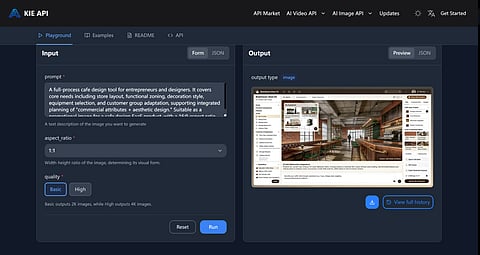
With your API key in hand and the documentation reviewed, the next step is to create an image generation task. This involves selecting the model and specifying parameters like the prompt, aspect ratio, and quality. You can also provide an optional callback URL to receive notifications upon task completion. Once the task is created, the system will assign a task ID for monitoring the task’s progress.
After submitting the task, you can monitor its progress through the Seedream 4.5 API by querying the task status. The task will move through various stages, such as waiting, generating, and completing. Once the task is finished, you can retrieve the image via the provided result URL. This allows you to download the generated image and use it within your platform or project.
As small businesses seek to scale their operations and enhance their visual content, Seedream 4.5 API offers an affordable and efficient solution. By leveraging Kie.ai's competitive Seedream 4.5 API pricing and comprehensive Seedream 4.5 API documentation, businesses can easily integrate advanced image generation capabilities without breaking the bank. With added benefits like reliable performance, commercial usage rights, and free trials for new users, Kie.ai ensures businesses have everything they need to succeed in the digital world.
