.png)

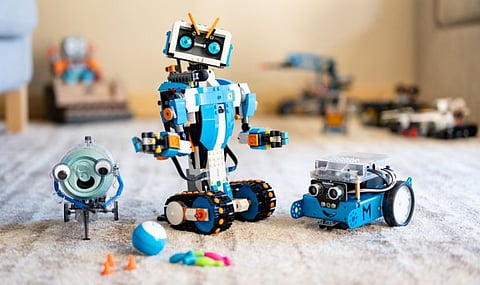
The list covers nine products, including educational robots, programmable cars, robotic arms and quadruped platforms for different experience levels.
These kits introduce block coding, Python, JavaScript and C++, helping users explore automation, sensor integration and robotics development.
Buyers can compare hardware flexibility, connectivity, expandability and complexity before selecting a suitable robotics platform.
Mini robots are no longer novelty gadgets. Compact controllers, affordable sensors and accessible coding tools let enthusiasts build machines that navigate, follow lines and respond to surroundings. For students, these kits make robotics, electronics and artificial intelligence tangible. For experienced makers, they offer practical platforms to test code and prototype automation. Here are nine options, from coding robots to robotic arms. Their differences matter: some prioritize guided lessons, others expose hardware interfaces, sensor data or repeatable movement for more independent experimentation and prototyping.
LEGO’s Computer Science & AI range is its current classroom offering, following SPIKE’s retirement. The grades 6–8 kit combines LEGO elements, a programmable controller, motors and a color sensor for coding-led builds. Designed for group learning, it suits collaborative projects. LEGO ended SPIKE sales on June 30, 2026, but app support continues until June 2031. Check the remaining SPIKE stock carefully.
The mBot2 is an aluminum wheeled robot built around CyberPi. Ultrasonic and quad-RGB sensors support obstacle avoidance and line-following; a gyroscope, accelerometer and microphone enable further experiments. Bluetooth and Wi-Fi provide wireless control. Beginners use Scratch-style blocks in mBlock before progressing to Python. It suits learners seeking both assembly and coding depth.
BOLT+ is a sealed programmable sphere, letting users focus on coding rather than construction. Its LED matrix displays patterns, while onboard sensors support motion-responsive activities. The Sphero Edu app offers visual coding and JavaScript. It suits beginners learning sequencing, loops and responsive behavior, but its enclosed design limits hardware customization.
Arduino Alvik is a compact mobile robot built around Nano ESP32. Line-following and distance-sensing hardware, plus LEGO Technic-compatible mounts, make it expandable. Users can explore MicroPython and Arduino programming while working with sensor data. It suits intermediate learners who want an open development environment and room to add mechanisms.
Cutebot Pro is a two-wheel robot car for BBC micro:bit. Motors, line-tracking and distance sensing support route-following and obstacle-detection projects. Users start with Microsoft MakeCode blocks and can progress to JavaScript or Python through compatible micro:bit tools. It suits younger beginners. Check whether the micro:bit controller is included; bundles vary.
Also Read: GM Plans 20% Robotics Boost by 2028 as UAW Warns of Job Threats
PiCar-X is a camera-equipped car for Raspberry Pi users. Its pan-and-tilt camera, ultrasonic sensor and motorized chassis support remote driving and navigation experiments. Python and graphical programming are available, while Raspberry Pi compatibility opens access to computer-vision and AI libraries. It suits intermediate or advanced hobbyists. Confirm whether the Pi is included.
Magician Lite is a desktop robotic arm, not a wheeled robot. Its articulated joints, interchangeable end effectors and teaching software support pick-and-place routines, drawing and basic automation. It introduces motion control and repeatable tasks associated with industrial robotics. Calibration is more demanding than coding cars, making it suitable for intermediate users and labs. Pricing varies by configuration.
This compact four-axis arm brings desktop manipulation to maker projects. Accessories such as grippers or suction tools enable sorting and palletizing demonstrations. Users explore coordinated joints, end effectors and scripted movement. It targets intermediate and advanced makers. Check controller, accessories and software compatibility.
Bittle X is a quadruped kit with four articulated, servo-driven legs. Building and tuning its gait introduces assembly, balance and embedded control—challenges absent from wheeled platforms. Petoi supports block coding, Python and C++, taking users from preset movements to custom behaviors. It suits intermediate makers comfortable with calibration.
Choose based on intended projects. Beginners may prefer BOLT+ or Cutebot Pro; Python learners can grow with mBot2 or Alvik; manipulation enthusiasts should compare the desktop arms. Check expandability, software compatibility, spare-part access, included controllers, difficulty and total budget.
Also Read: AI-Powered Robotics and Automation Transforming Manufacturing in 2026
1. What are the best mini robots for beginners?
Sphero BOLT+, Makeblock mBot2 and ELECFREAKS Cutebot Pro are beginner-friendly options. They introduce coding, movement, sensors and basic robotics concepts through accessible programming environments.
2. Which robotics kits support Python programming?
Makeblock mBot2, Arduino Alvik, SunFounder PiCar-X and Petoi Bittle X support Python-based development, allowing users to explore automation, sensor integration and customized robot behaviors.
3. Are programmable robotics kits suitable for adults?
Yes. Adults can use these kits to develop programming skills, experiment with electronics, understand automation and build practical robotics projects, regardless of previous engineering experience.
4. What is the difference between a coding robot and a DIY robotics kit?
Coding robots generally arrive assembled or partially assembled for programming activities. DIY robotics kits require more construction, wiring and hardware customization alongside software development.
5. What should buyers consider before purchasing a robotics kit?
Buyers should compare programming languages, hardware compatibility, sensor capabilities, expandability, assembly difficulty, learning resources, spare-part availability and overall budget before choosing a robotics kit.