.png)

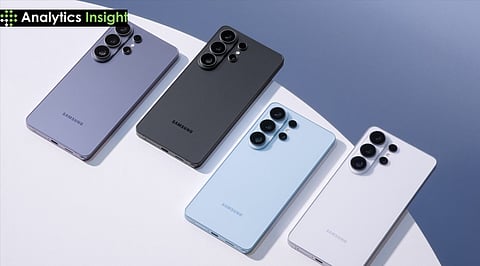
Samsung Galaxy S26 introduces AirDrop-style sharing, making it easier to send files between Galaxy phones and iPhones without using extra apps or complicated steps.
With Quick Share support for AirDrop, Galaxy S26 users can quickly transfer photos, videos, and documents to nearby iPhones via a secure wireless connection.
The new cross-platform sharing feature on the Galaxy S26 eliminates common file-transfer problems and helps Android and iPhone users share content faster and more smoothly.
Sharing files between Android and iOS Phone users has always been a frustrating task. Whether it is photos, videos, or any important document, the real challenge begins when you have to share it from an Android device to an iPhone, or vice versa. This process mainly depends on messaging apps, email, or cloud storage.
Samsung is now determined to address this long-standing problem. The launch of the Galaxy S26 has introduced a new feature that works with AirDrop via its built-in Quick Share system. This update will allow Samsung users to send files directly to nearby iPhones with only a few taps.
At first, it may seem like a small change, but it will make a big difference. Galaxy S26 is making everyday work and file sharing simpler and less frustrating with the Quick Share system.
The first thing to understand here is how Quick Share connects with iPhones. On the Galaxy S26, the Quick Share feature will support devices that have AirDrop. So, in a way, this means when this feature is on, Galaxy users can see nearby iPhones.
To start the process, users need to simply select a file, tap the Share button, and choose Quick Share. If an iPhone is nearby with its AirDrop feature turned on, the device will automatically appear on the screen. Users have to select the device they want to share the files with, and the sharing process will be done instantly.
The transfer happens using wireless technology. The devices connect via Bluetooth to identify each other before establishing a faster Wi-Fi connection for data transfer. The system delivers fast and dependable performance.
The process requires consideration of privacy as a critical factor. The file transfers between two devices without using the internet or any external servers. So, the data remains safe.
The next thing that users should take care of is the process to enable Quick Share. This feature may not be turned on by default. So, users should activate it manually in the settings menu. Below are the steps to turn on the feature:
Go to Settings on your Galaxy S26
Select Connected Devices.
Choose Quick Share
Once the feature is turned on, adjust sharing visibility. Keep it to ‘Everyone’. After you have completed these steps, your device will be visible to all nearby phones, including iPhones, provided they have AirDrop turned on.
For iPhone users as well, AirDrop won’t be turned on automatically. It should be done manually. Next, adjust it by selecting ‘Receive files from everyone.’ Once both devices are visible, the connection will work smoothly. The process usually takes only a few seconds.
The setup is simple and doesn’t require any third-party application. It uses the built-in tools available on the devices.
Also Read: Critical iOS Bug Exposes iPhone Users to Cyber Attacks, Apple Pushes Emergency Update
The introduction of Quick Share on Samsung Galaxy S26 devices seems to solve a longstanding issue. In every other sector of life, including family and workplace, you will meet people who use different types of smartphones. Therefore, it is impossible to avoid the clash between Android and iOS devices.
Previously, sharing files between these devices could be slow or inconvenient. Users must upload files to cloud storage or send them through messaging apps. These methods worked, but they were not always quick.
The direct file sharing saves time and effort. Students can exchange notes instantly. Professionals can share important documents during meetings in no time. Even friends can share photos and videos without worrying about file size.
Now, if you give it some thought, a broader trend will emerge. Companies are trying to make their devices more compatible with each other. They don’t want to keep their systems exclusive anymore. Instead, the focus is on user convenience and connectivity.
Also Read: Samsung Galaxy Z Fold 8 Leak Reveals Bigger Battery, Faster Charging Boost
The Galaxy S26 introduces a simple but meaningful improvement that users have long been looking forward to. This update will go live in South Korea first, then eventually in North America, Latin America, Europe, Hong Kong, Japan, Southeast Asia, and Taiwan. This one feature will make file sharing convenient for millions of users.
This update removes one of the biggest barriers between Android and iOS. The more technology continues to evolve, features like this will likely become standard across the smartphone industry. For now, Galaxy S26 users can enjoy a smoother and more flexible way to share files with iPhone users.
Can the Samsung Galaxy S26 send files directly to an iPhone?
Ans: Yes, the Galaxy S26 can send files directly to iPhones using its Quick Share feature, which now works with AirDrop for fast wireless transfers.
Do I need to install any additional apps to use this feature?
Ans: No, you do not need extra apps. The feature is built into the phone. You only need to turn on Quick Share on the Galaxy device and AirDrop on the iPhone.
What types of files can be shared between Galaxy and an iOS Phone?
Ans: Users can share photos, videos, documents, contacts, and other common files. The system supports most file types used in daily activities.
Is the file transfer between Galaxy and iPhone secure?
Ans: Yes, the transfer is secure because the file moves directly between the two devices using a private wireless connection without passing through the internet.
Why is this new feature important for users?
Ans: It makes file sharing faster and easier between Android and iPhone devices. This saves time and removes the need for email, messaging apps, or cloud storage for simple transfers.
