.png)

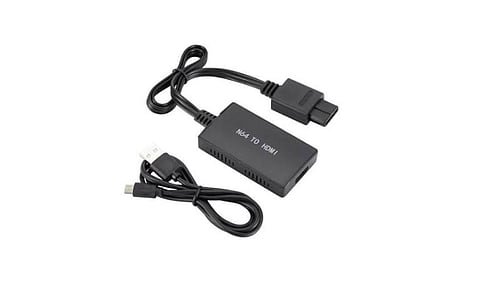
Nintendo 64 needs an HDMI adapter to work with most modern televisions.
The right converter can prevent black screens and other display problems.
Nintendo Switch 2 offers better graphics, modern connections, and higher screen resolutions.
The Nintendo 64 has a special place in the handheld gaming console world. It has presented gamers with titles like Super Mario 64 and The Legend of Zelda: Ocarina of Time. Even today, gamers love going back to these classic titles, and that’s where the issue begins. Playing them on a modern television isn’t a simple task.
The biggest challenge with the Nintendo 64 is the absence of the HDMI port. The original Nintendo 64 uses older AV connections, while most new televisions come with HDMI ports. Therefore, connecting the console without the right adapter often shows a black screen or a ‘No Signal’ message.
The process to connect the console to a modern TV without hampering the picture isn’t a tough thing. Players should know the exact process. They should have the right cables and an HDMI converter. What you should do first is to check your TV ports. If your TV has only HDMI connections, you have to go for an active converter to make the connection work.
The first step, therefore, is to get an HDMI adapter. You should buy one that supports 240p and 480i signals. Most Nintendo 64 games use these older display formats. If your converter is poor in quality, it will fail to read the game. Again, you will get a black screen.
Once you have the adapter, turn off both devices and connect the Nintendo 64 AV cable to the Multi Out port at the back of the console. The cable generally has three plugs, and you have to connect each of them to the matching one on the HDMI converter.
The next step is to connect one end of the HDMI cable to the converter and the other end to an available HDMI port on your television. Now, if your converter accepts only a USB power supply, connect it to a suitable power source.
Once this setup is done, turn on your Nintendo 64 and select the HDMI input you are using. Now, start a game, and if everything is connected correctly, the game should appear on your screen. However, there can still be a black screen or No Signal issue. In those cases, check whether the HDMI cable is properly connected.
You should also remove the game cartridge and clean its contacts carefully before putting it back. Make sure the Jumper Pak or Expansion Pak is fitted correctly, as the console needs one of these to start.
Also Read: LEGO Batman Game Adds GameShare Support on Nintendo Switch 2
Now that we are talking about Nintendo 64, a comparison with Nintendo Switch 2 automatically comes to mind. These two gaming consoles belong to two very different gaming generations. While one brings back the charm of classic games, the other offers modern graphics, better hardware, and advanced features.
Nintendo 64 arrived in 1996 and became popular for its 3D games, unique controller, and multiplayer experience. It has brought titles like Super Mario 64 and GoldenEye 007 to gamers, which made it one of the most favorite consoles of all time. Even after several decades, these games continue to attract players who enjoy retro gaming.
Nintendo Switch 2 arrived in 2025 to take gaming further. It features a 7.9-inch LCD screen with a resolution of 1920 x 1080. If players connect this console to a compatible TV through its dock, it supports up to 4K resolution at 60fps. Some games can also run at up to 120fps at lower resolutions.
There are multiple differences between these two Nintendo consoles, but connectivity is one of the biggest among them. Nintendo 64 needs an external HDMI converter to work with most modern TVs. Switch 2, on the other hand, comes with a dock that supports HDMI output. This makes connecting it to a television much easier. Players do not have to worry about buying separate converters or checking older AV connections.
Apart from that, the 2025 console offers improved picture quality, better colors, modern graphics, and other features that fit the latest gaming requirements. Therefore, Switch 2 is a better choice for new games that need advanced features, while Nintendo 64 remains a great option for people who enjoy classic gaming.
Also Read: How to Play Nintendo Switch with 2 Players: A Set-Up Guide
Nintendo 64 represents the golden era of Nintendo gaming. Therefore, if you want to enjoy the console to date, the steps are simple. All you need to have is the right adapter. A good HDMI converter, working AV cables, and the correct TV settings can help you avoid most picture problems.
Nintendo Switch 2 may offer better graphics and modern features, but the Nintendo 64 still has something special. If you enjoy classic games, connecting the old console to a modern TV is worth the effort.
1.Can I connect a Nintendo 64 directly to an HDMI TV?
Ans: No. The original Nintendo 64 does not have an HDMI port. You need an HDMI converter or a dedicated retro gaming upscaler.
2.Why does my Nintendo 64 show No Signal on my TV?
Ans: This can happen because of a faulty cable, an incompatible adapter, a loose connection, or a problem with the game cartridge.
3.Does an N64 HDMI adapter improve picture quality?
Ans: An adapter converts the old video signal into HDMI. Some models also improve how the picture looks on modern TVs, but they cannot add details that were missing from the original game.
4.What resolution does the Nintendo 64 support?
Ans: Most Nintendo 64 games use 240p, while some games and display modes use 480i.
5.Is Nintendo Switch 2 better than Nintendo 64?
Ans: Switch 2 offers better graphics, modern features, and 4K TV output. However, Nintendo 64 remains a good choice for players who enjoy classic games.