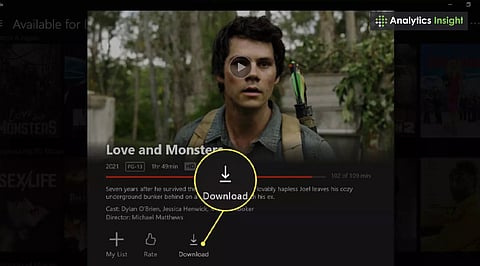
.png)

You can download Netflix movies on a laptop using the Netflix app for Windows or macOS workarounds.
Netflix offline viewing depends on titles available for download.
Adjusting Netflix download settings helps balance storage space and video quality.
Watching movies on Netflix is easy when you have a stable internet connection. But what happens when you are travelling, flying, or somewhere without Wi-Fi? Downloading movies in advance can help you enjoy your favourite shows and films without an internet connection. Here is how to download Netflix movies on a laptop and watch them offline.
Yes, users can download movies from Netflix on laptops. Windows users need a compatible version of Windows 10 or Windows 11 to download the official Netflix app from the Microsoft Store. Mac users, however, may need to explore alternative options, such as screen mirroring, as the official download feature has different availability across platforms.
Follow these simple steps to download your favourite movies and watch them offline.
First, download the Netflix app from the Microsoft Store. Follow these steps to get started:
Open the Microsoft Store on your laptop.
Search for the Netflix app and install it.
Sign in to your Netflix account using your credentials.
Also read: Websites to Download Netflix Movies and Shows for Free.
Not every Netflix title is available for offline viewing due to licensing restrictions. To find movies and shows you can download, follow these steps:
Open the Netflix app and go to the Menu.
Select the “Available for Download” option to browse eligible titles.
Look for the download icon, represented by an arrow next to the title.
Netflix download settings let users manage video quality based on their preferences and available storage. Standard quality generally takes up less space and downloads faster, while high quality offers a clearer picture but requires more storage.
On supported Windows laptops, downloaded content is managed through the Netflix app. Check the available storage before downloading multiple movies or shows. The movie downloads link also provides information about other movie download options.
Once you have found a movie or show available for download, follow these steps to watch it without an internet connection:
Click the download icon next to the movie or series.
Open the Downloads section of the app.
Select the downloaded title to watch it offline.
Also read: How to Safely Download and Install Games on Your Laptop.
Downloading movies in advance can make travelling and long flights more enjoyable. By following these steps, users can download eligible Netflix movies and watch them offline on supported devices. Choosing the right download quality and checking available storage can also help users make the most of their viewing experience.