.png)

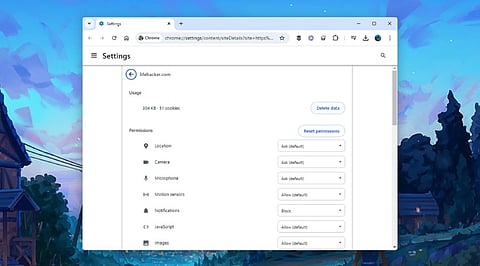
Review browser permissions regularly to remove unnecessary access and reduce privacy risks.
Limit AI extensions, clipboard, file, camera, and microphone permissions to trusted sources only.
Keep browsers updated to benefit from the latest AI security features and vulnerability fixes.
AI browsers have changed how people browse the internet. They can summarize web pages, answer questions, fill online forms, compare products, and complete simple tasks. Many of these features depend on browser permissions. These permissions allow access to the camera, microphone, files, clipboard, location, and other sensitive areas of a device.
The rapid rise of AI browsers has made permission settings far more important than before. Industry reports show that 88% of organizations now use AI regularly, up from 78% in 2024. Research also shows that 62% of organizations already test or use AI agents that perform tasks instead of only answering questions. At the same time, analysts expect the AI browser market to grow from $4.5 billion in 2024 to $76.8 billion by 2034, with an annual growth rate of 32.8%. These numbers show why every permission deserves careful attention before AI features become part of everyday browsing.
Every website asks for different permissions. Some request location details for maps, while others ask for camera or microphone access for meetings. AI browsers often combine several permissions during a single task, which makes regular reviews more important than ever.
Unused permissions create unnecessary exposure. Camera, microphone, clipboard, notifications, USB devices, Bluetooth, and file access should stay available only for trusted websites. A quick review of browser settings helps remove permissions that no longer serve any purpose. This simple habit lowers privacy risks and keeps sensitive information under better control.
AI extensions bring useful features such as writing assistance, page summaries, and research support. At the same time, these tools often receive broad access inside the browser. Security researchers warn that browser agents inherit existing login sessions. This means an extension could reach email accounts, cloud storage, work platforms, and online services that already remain open inside the browser.
Regular extension reviews help reduce unnecessary access. Removing unused AI extensions also lowers the number of applications that handle sensitive information during daily browsing.
The clipboard stores everything copied from a device. Passwords, payment details, API keys, customer records, wallet addresses, and confidential notes often stay there for short periods.
Modern AI tools sometimes read clipboard content to simplify tasks such as writing, editing, or data entry. That convenience also creates privacy concerns. Permission settings should allow clipboard access only for trusted websites or extensions that genuinely need this feature. Simple changes like this protect valuable information from unnecessary exposure.
Also Read - Best AI Chrome Extensions to Boost Productivity and Save Hours
Voice assistants and visual AI tools have made camera and microphone permissions far more common. Video meetings, voice commands, live translations, and image analysis all rely on these features.
Permanent access rarely makes sense for most websites. Temporary permission offers a safer option. Access should remain active only during the exact session that requires it. Once the task ends, browser settings should return to the default state. This habit reduces privacy risks without limiting useful AI features.
Many websites ask for notification access within seconds of a visit. News sites, shopping stores, blogs, and unknown pages often display these requests immediately.
Security experts continue to report notification abuse as a common method for phishing attempts and fake security alerts. AI assistants can also summarize notifications across multiple websites, which increases the value of trusted notification sources. Regular permission reviews help remove unknown websites that no longer deserve notification access.
Also Read - What is Apple Intelligence? Complete iPhone Guide to Apple's AI Features
Browser password managers simplify online logins. AI browser agents operate with the same authenticated browser session already active on the device. This allows quick access to websites without repeated sign-ins.
That convenience also increases security responsibilities. Password managers should stay protected with strong authentication. Browser settings should prevent unnecessary extensions from reaching stored credentials. Careful permission control helps protect accounts from unwanted access.
Many AI browsers can open PDFs, summarize documents, organize files, and upload content during automated tasks. These features require permission to reach local storage.
Only trusted websites and verified AI tools should receive file access. Browser settings also deserve a review for chat history, cloud synchronization, uploaded documents, and stored prompts. Many AI browsers offer controls that limit conversation storage or cloud retention. These options help protect personal and business information from long-term storage.
Browser developers continue to add new AI features every few months. Google recently introduced WebMCP, a technology that allows websites to connect with AI agents through structured tools instead of traditional page reading. Chrome Enterprise also added AI management features that help organizations control browser security policies.
New features arrive alongside important security fixes. Regular browser updates protect devices from newly discovered threats while improving privacy controls for AI services. Security experts also identify several growing risks for AI browser agents, including indirect prompt injection, sensitive data exposure, excessive permissions, and limited visibility into automated actions. Current software offers stronger protection against these emerging threats.
Why This Matters
AI browsers now handle tasks that involve personal data, business documents, online accounts, and everyday browsing activity. Permission settings decide how much access these tools receive during each task. Careful permission management protects sensitive information, reduces security risks, and helps AI features work safely without exposing valuable data to unnecessary access.
AI browsers are enabling lightning-fast research, automated processes, and enhanced productivity but the availability of advanced features is dependent on permission settings. Features such as camera access, microphone usage, clipboard access, notifications, password storage, access to local files, and AI conversation history receive regular attention in this process. A full permission assessment can take only a few minutes, while it contributes to enhanced privacy and security as well as reduces unneeded exposure. As AI web browsers emerge as a necessity for personal as well as corporate users, strict permission management emerges as an easy and efficient way of browsing safety.
1. Why are browser permissions important for AI browsers?
AI browsers use permissions to access device features like the camera, microphone, files, and clipboard to complete tasks. Managing these permissions helps protect your privacy and sensitive data.
2. Which browser permissions should I review first?
Start with camera, microphone, location, clipboard, notifications, file access, password manager access, Bluetooth, USB devices, and installed AI extensions.
3. Are AI browser extensions safe to use?
Trusted extensions can be helpful, but unused or unverified extensions may have broad access to your browsing sessions and sensitive information. Review them regularly.
4. How often should I check browser permissions?
A monthly review or checking permissions whenever you install new AI tools or extensions is a good security practice.
5. Do browser updates improve AI security?
Yes. Updates often include security patches, enhanced privacy controls, and protections against emerging AI-related threats such as prompt injection and excessive permissions.
