.png)

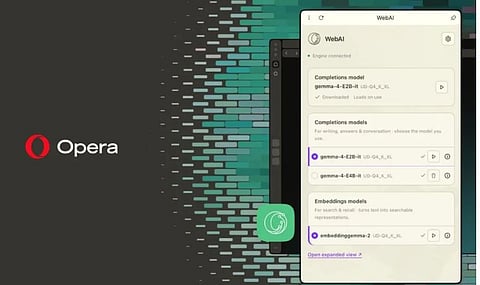
Opera's Web AI feature allows websites and browser extensions to access AI models running locally on users' computers.
Local processing reduces the need to send information to external AI providers. Users can explore applications such as text generation, content classification, and information organization.
The feature is opt-in and requires users to enable it through browser settings. Hardware compatibility, model performance and developer adoption will influence its wider usefulness.
Opera is bringing AI closer to the way people browse the web. Its new Web AI feature allows websites and browser extensions to use AI models running directly on a user's computer, rather than relying entirely on cloud-based services. The move gives users another way to work with AI while keeping the information processed by these local models on their own devices.
Announced in October 2026, Web AI is part of Opera's wider push to make local AI a regular feature of its browsers. It is an early preview rather than a finished, full-scale product, but it offers a glimpse of how everyday browsing could change.
Traditional AI assistants usually send prompts and relevant information to remote servers, where models process the request and return an answer. Opera's Web AI takes a different route. It allows compatible websites and extensions to access AI models running through the browser on the user's computer.
There is no need to install a separate AI application, configure a local server or obtain an API key. Opera handles the local AI infrastructure within the browser. Its implementation is designed to work with different models rather than locking developers into a single provider.
At launch, supported options include Google's Gemma models and Apple's on-device foundation model on compatible Macs. Opera also plans to expand the range of available models and tools.
Also Read: Best AI Browser Assistants for Daily Work in 2026
Privacy is one of the main reasons to run AI locally. When a website or extension uses Web AI to process information on the device, that information does not need to be sent to an external AI provider for the task.
For example, a browser extension could examine the content of an open page, identify useful information, or organize tabs using a local model. Processing happens on the computer, reducing the need to share that content with a cloud AI service.
Users also have control over whether the feature is enabled. Web AI is opt-in, meaning models are not downloaded automatically. People must turn it on in the browser settings, and site-specific permissions allow them to decide which websites can access the local AI capabilities.
That distinction matters: local AI can reduce data sharing, but it does not mean every activity in Opera is automatically processed offline. Opera's regular AI services and other online browser features may still rely on remote systems.
Web AI is designed to give websites and extensions more useful ways to work with information. Its capabilities include generating text, classifying content, and identifying relationships between different pieces of information.
In practical terms, developers could build extensions that organize browser tabs, flag potentially misleading headlines or identify job listings that match certain requirements. These are examples of what the technology could support, rather than a guarantee that every feature is already built into Opera.
For developers, the system also lets them add AI-powered functions without maintaining their own model infrastructure or paying for every cloud-based request. This could make experimentation easier, particularly for independent developers and smaller teams.
Also Read: Kitesurf Browser: Everything You Need to Know about AI Agent Browsing
Web AI is currently available as an opt-in early preview on 64-bit Windows computers running Intel or AMD processors and Macs with Apple silicon. It is not currently supported on Intel-based Macs, Linux or Windows on Arm.
Getting started involves updating Opera One, opening Settings, navigating to Opera AI and enabling the Web AI API. The browser then downloads a compatible model, which may take a few minutes. Once enabled, users can try compatible extensions.
Since the models run locally, performance depends on the computer's hardware. A system with limited processing power may take longer to generate responses. Model downloads also require storage space, so the experience will not be identical across all devices.
Opera's move reflects a broader shift towards AI that can run on personal devices. Local processing can reduce dependence on cloud services, improve control over data and give developers more freedom to experiment.
Still, Web AI is in its early stages. Its usefulness will depend on model quality, hardware performance, and how many websites and extensions adopt it. Users should also remember that local processing does not make the entire browser experience private by default.
For now, Opera's approach offers a practical alternative for certain AI tasks. If the company can make local models faster and easier to use, the browser could become more than a window for accessing online AI services. It could also become a place where useful AI tools run directly on the user's computer.
What is Opera's on-device AI browser feature?
Opera's Web AI is a browser feature that allows compatible websites and extensions to use AI models running directly on a user's computer. Instead of depending entirely on remote servers, these models process supported tasks locally. The feature is designed to make AI tools more accessible while giving users greater control over how certain information is processed.
How does Opera Web AI work?
Opera Web AI provides websites and browser extensions with access to locally running AI models through the browser. Users enable the feature in their settings and download a compatible model. Once configured, supported websites and extensions can use the model for tasks such as text generation, classification and content analysis without sending that information to an external AI provider for local processing.
Does Opera's on-device AI send personal information to the cloud?
When a compatible website or extension uses a local model to process information, that particular processing does not need to involve an external AI server. However, this does not mean all browser activity remains offline. Regular websites, online services and other Opera AI features may still communicate with remote servers depending on how they operate.
What are the benefits of running AI models locally?
Running AI models locally can reduce the amount of information shared with external AI providers. It may also reduce dependence on internet connectivity for supported tasks and give developers more flexibility when building AI-powered browser extensions. Another advantage is that users can experiment with certain AI features without relying on cloud-based API services for every request.
Which AI models does Opera support through Web AI?
Opera's initial Web AI preview includes support for Google's Gemma models and Apple's on-device foundation model on compatible Apple silicon Macs. The company has indicated that it intends to expand model availability. The actual models users can access depend on their operating system, hardware compatibility and the options supported by the browser.