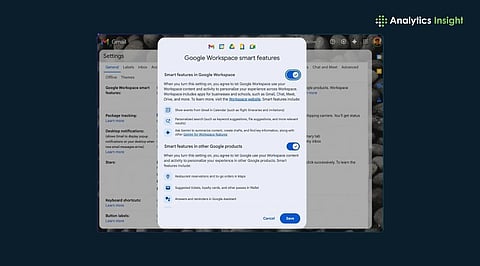
.png)

Gemini can be disabled in app settings, Workspace controls, or Android system-level configurations.
Turning off smart features reduces AI prompts, protects data usage, and restores classic interfaces.
Some Gemini integrations require activity controls and feature toggles across multiple Google account panels.
Disabling a feature in a Google product usually requires minimal effort. Users only need to open the menu, uncheck a box, refresh the page, and continue working with updated settings. Gemini has changed that muscle memory. The new AI layer is now integrated with Gmail, Photos, Chrome, and Android and forms part of the core product experience.
Now, when users search for an ‘off’ button, they find a trail of settings, permissions, and trade-offs. This design reflects how deeply artificial intelligence is embedded in the structure of modern technology platforms.
Gemini arrives pre-enabled in many experiences. In Gmail, it writes and summarises. In Photos, it answers questions about your memories. On Android, it positions itself as the next Assistant.
The shift is subtle but important: AI is no longer a feature you choose. It is the environment you start in. It changes the psychology of control. Disabling Gemini is not about removing a tool; it is about reclaiming a version of the product that existed before the AI layer.
Among all Google services, Gmail still offers the most visible way to step back. Turning off Smart features removes the Gemini panel and the writing assistance.
The moment one does that, they also lose the quiet automation people have come to rely on, predictive typing, automatic mail categorisation, and nudges about bills and deliveries.
The choice is no longer ‘AI vs no AI.’ It becomes automation vs manual effort. For many users, that trade-off quietly nudges them back to leaving Gemini on.
Google Photos tells a different story. Gemini powers the new conversational search. Switching it off, when available, often only limits the interface rather than fully restoring the old system.
The product itself has been rebuilt around AI retrieval. In practical terms, one is not disabling a feature. They are trying to roll back the logic of how the app understands their library, and that is much harder to undo.
Also Read: How to Disable Spotify Auto-Play Feature on Android Auto Easily
On the browser and the phone, Gemini acts less like a tool and more like infrastructure. It connects to apps, replaces the voice assistant, and learns from activity history.
You can:
Disconnect app integrations
Turn off activity tracking
Prevent it from becoming the default assistant
This is the clearest signal of the direction of travel: AI is moving to the operating layer, where user control has historically been the weakest.
Most users think they are turning off Gemini when they hide the panel or disable a feature. In reality, the most meaningful control sits elsewhere, in the activity and personalisation settings.
That is where you decide whether:
Your prompts are stored
Your behaviour trains the system
The AI becomes personalised
The interface may disappear, but the data relationship is what defines the power dynamic.
There is a reason many people switch AI features back on after turning them off. Life without them is slower.
Emails take longer to draft. Photos take longer to find. Voice commands feel less capable. This is not accidental. The more useful AI becomes, the harder it is to walk away from it. The lock-in is no longer technical; it is behavioural.
The growing frustration is not about Gemini itself. It is about the absence of granular control.
Users want to:
Keep smart composing, but remove generative writing
Use classic photo search without conversational AI
Run an assistant without continuous data learning
In other words, they want AI to act like earlier features, optional, modular, and reversible. That model is fading.
Also Read: Netflix Phone-to-TV Streaming Disabled? Here’s How to Watch
The difficulty of disabling Gemini is not a temporary design flaw. It is a preview of how AI will live inside mainstream technology.
It will be:
On by default
Deeply integrated
Managed through data permissions rather than simple toggles
From a user perspective, the practical takeaway is clear. Gemini’s footprint can be reduced through available settings, and its data access can be limited. However, stepping entirely outside the AI layer is no longer possible. The issue is no longer how to switch Gemini off, but whether, in the next generation of software, the option to switch off will remain meaningful at all.
Is it possible to completely disable Gemini across all Google services?
No. Users can restrict features, disconnect integrations, and deactivate activity tracking, but Gemini remains embedded within the core architecture of several Google products.
What is the impact of turning off Smart features in Gmail?
Disabling Smart features removes Gemini-enabled writing and summarisation tools, while also withdrawing automated functions such as predictive text, email categorisation, and reminder prompts.
Does deactivating Gemini activity prevent Google from processing personal data?
It halts the storage and personalisation of future interactions with Gemini, but routine data processing necessary for delivering core services continues.
Why does Google Photos continue to rely on AI after Gemini is limited?
Artificial intelligence now underpins search and content organisation; restricting the interface does not fully revert the platform to its earlier operational model.
Can Gemini be fully removed from Android devices?
On most devices, it cannot be entirely uninstalled; users can only reassign the default assistant, revoke permissions, and disable activity to minimise its functional presence.
