.png)

LinkedIn offers permanent deletion or reversible hibernation, depending on your needs.
Download your data first, since recovery becomes impossible after 14 days.
Administrative roles, subscriptions, or unpaid balances can delay account closure.
People leave LinkedIn for all kinds of reasons. Some find networking overwhelming. Others want more privacy. Some retire or switch careers and simply move on.
Whatever your reason, this guide has you covered. It explains the difference between permanent deletion and temporary hibernation, what happens to your data, and the exact steps to remove your LinkedIn account for good.
LinkedIn gives you two choices: permanently close your account or temporarily hibernate it.
Permanent deletion
Your profile, connections, messages, recommendations, and endorsements are removed.
A 14-day grace period allows you to sign back in and cancel the deletion.
After that, restoration is no longer possible.
Some data may remain for legal reasons.
Hibernation
Your profile becomes invisible.
You disappear from searches.
Messages stay in conversations but show as “A LinkedIn member.”
You can reactivate anytime after 24 hours by logging back in.
If you’re unsure, hibernation is often the safer first step. If you’re certain you’re done, permanent deletion makes sense.
Before you proceed, download your data. Once deletion becomes permanent, recovery is not possible.
On Desktop
Log in to LinkedIn.
Click your profile icon in the top-right corner.
Select Settings & Privacy.
Scroll to Account management.
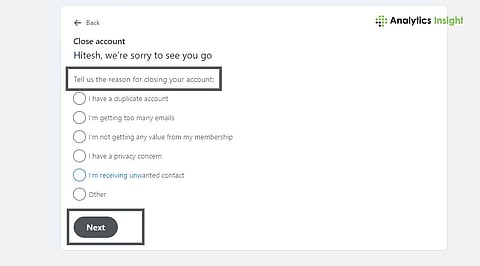
Click Close account.
Choose your reason and enter your password to confirm.
If you have an enterprise account or hold an admin role on a company page, you may need to resolve that first.
On Mobile
Open the LinkedIn app.
Tap your profile picture.
Go to Settings - Account preferences.
Select Close account.
Choose a reason and enter your password to finish.
That’s it. The 14-day recovery window begins immediately.
A data archive is a backup copy of your profile history. It can include connections, messages, recommendations, and account details.
To request it:
Go to Settings & Privacy.
Select Data Privacy.
Click Get a copy of your data.
Choose specific items or request the full archive.
LinkedIn emails a download link that remains valid for 72 hours. Save it somewhere secure.
Sometimes LinkedIn won’t let you close your account immediately. Here are common roadblocks:
Active Premium subscription: Cancel it first or wait for billing to end.
The only person who can manage a Page or Group must have another person take on the role of administrator.
Enterprise license: Your administrator needs to remove your seat from the system.
Outstanding ad balance: Clear unpaid LinkedIn Ads charges.
Restricted account: Resolve policy issues with support.
Technical glitches: Clear browser cache or try another device.
Most issues are administrative, not technical.
Here’s what the timeline looks like:
Your profile will become hidden from others after 24 hours of your first day. The first two weeks of the period serve as a grace period during which you can still log in to your account and stop the deletion process. The process of deleting the complete system and backup data will start after 15 days and continue for 30 days. Your profile, along with your personal information, will become largely inaccessible after 30 days, but LinkedIn will retain specific details for legal requirements.
Search engines like Google may still temporarily show cached versions. That delay is normal and resolves when search engines refresh their indexes.
Connections, recommendations, posts, comments, and group memberships are permanently lost once deletion is complete.
The need for complete deletion disappears when privacy is your primary concern.
You can:
Switch to private mode when viewing profiles.
Turn off ad personalization.
Disable third-party data sharing.
Adjust search engine visibility.
Review generative AI data settings under privacy controls.
Sometimes these adjustments resolve the issue without losing your network connection.
Professionals who want to leave LinkedIn yet maintain their professional connections can choose from multiple options. GitHub serves as a common platform for developers to work on their projects. Creatives use Behance and Dribbble as their preferred platforms. ResearchGate serves as the primary research platform for researchers. Professionals today use Slack communities, Discord groups, and in-person industry events to build their professional networks.
Deleting your LinkedIn account isn't a dramatic move; it's just taking control of your digital presence.
Not sure yet? Hibernate first. If you're ready, download your data, follow the steps, and remember the 14-day window to change your mind. The right choice depends on your career stage and how you want to manage your online presence going forward.
Can I recover my LinkedIn account after deleting it?
The user can restore their LinkedIn account after deletion. The user can cancel their account deletion during the first two weeks after they log back in. The user will lose access to their account and data after the grace period concludes.
What’s the difference between deleting and hibernating my LinkedIn account?
Permanently deleting your profile and connections removes them. Hibernating simply hides your profile from searches and visibility. You can reactivate a hibernated account anytime by signing back in.
Will my messages disappear if I delete my account?
Your messages remain visible in other people’s inboxes, but your name will appear as “A LinkedIn member.” Your full profile and history will no longer be accessible.
Do I need to cancel LinkedIn Premium before deleting my account?
Yes. You must cancel any active Premium subscription first. If you don’t, LinkedIn may block the account closure until billing and subscription status are resolved.
How long does LinkedIn take to delete my data fully?
Your profile becomes invisible quickly, but full data removal can take several weeks. LinkedIn may retain certain information if required by law or regulation.
