.png)

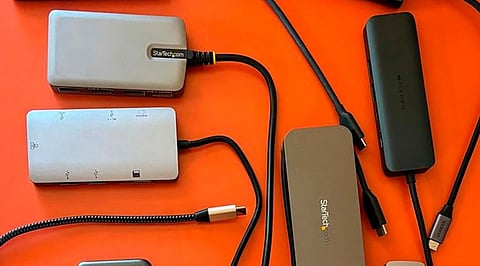
USB-C hubs: Best for affordable, portable access to HDMI, USB-A, cards, Ethernet, and laptop power.
Thunderbolt 4: The strongest value for most desktop setups with multiple displays, storage, peripherals, and Ethernet.
Thunderbolt 5: Worth the higher price for high-resolution displays, fast storage, 80Gbps bandwidth, and demanding workloads.
A simple USB-C hub can cost about USD 25, while a premium Thunderbolt 5 dock can cost more than USD 400. The choice depends on ports, displays, data speed, and laptop power limits. Current tests show a clear split: USB-C hubs suit travel, while Thunderbolt 4 docks suit many desks. Thunderbolt 5 suits high-end displays, fast storage, and heavy desktop work in most laptop setups.
A basic hub suits a laptop with few ports. A good model can add HDMI, USB-A, SD, microSD, and USB-C power input through one small unit. Anker lists a 7-in-1 hub at USD 25.99, with 4K60 HDMI and 85W power input. That price suits travel and home setups.
The next price step offers better USB speed and more ports. A strong USD 40 to USD 100 hub should offer 10Gbps USB, 4K60 HDMI, 85W to 100W power input, and Gigabit Ethernet. A cheap hub with only 5Gbps USB can still work, but a higher price should add clear gains.
Thunderbolt 4 offers up to 40Gbps bandwidth and can handle two 4K displays in suitable setups. PCWorld lists the Kensington Thunderbolt 4 Dual 4K Dock as a top choice, with a current price near USD 299.99. StarTech’s Thunderbolt 4/USB4 Quad Display Dock can cost about USD 254.70 at a current discount.
A lower-cost option works well. PCWorld lists the Ugreen Revodok Pro 13-in-1 at USD 129.99. The model offers three-display support, but laptop hardware can limit screen output.
Also Read - Top 10 USB 3.0 and USB-C Hard Drives Compared
Thunderbolt 5 doubles the core bandwidth to 80Gbps. Bandwidth Boost can raise display transmit speed to 120Gbps when video traffic needs extra capacity. Intel lists up to 240W power support, dual 8K display support, and high-refresh display support. Those numbers matter for creative work, large external storage, game laptops, and multi-display desks.
Tom’s Hardware tested the Plugable TBT-UDH2 at USD 349.95, the Keychron TB5D-1 at USD 349.99, and the UGREEN Revodok Maxidok at about USD 389.99 after a coupon. The UGREEN model adds a PCIe 4.0 M.2 slot with support for up to 8TB. Tests reached about 5,780 MBps read speed with a Micron 2500 SSD, while other setups reached about 5,400 MBps.
USB4 can reach 80Gbps. USB-IF published USB4 Specification Version 2.0 on April 2, 2026, and USB-IF also lists USB4 compliance tools from July 2026. The label needs care. A USB4 port does not guarantee the same features across every laptop and dock.
DisplayLink also offers a middle path. Current PCWorld tests note that DisplayLink docks can deliver multi-display features through standard USB-C connections. Such docks suit office work when laptop hardware lacks Thunderbolt.
Match the dock to the laptop before any price comparison. Check the host port speed, display limits, power limit, and system support. A 100W dock cannot force a laptop to accept 100W. Several display outputs cannot guarantee the same number of active screens on every laptop.
Port speed matters more than port count. A 13-in-1 dock can offer less useful capacity than a 9-in-1 model with faster USB, better Ethernet, and stronger display support. Gigabit Ethernet suits most users, while 2.5GbE has more value for fast local networks, NAS storage, and large file work.
Also Read - Why Smartwatches Still Don't Use USB-C Charging Ports
A USD 25 to USD 50 USB-C hub remains the sensible choice for basic travel needs. A USD 40 to USD 100 advanced hub fits a portable setup. A USD 150 to USD 250 Thunderbolt 4 dock offers the strongest value. A USD 300 to USD 400 Thunderbolt 5 dock makes sense for high-resolution displays, fast storage, and heavy workloads.
The smart 2026 choice does not start with the most expensive dock. Start with the laptop port, displays, storage, and power level. For most desk setups, Thunderbolt 4 still gives enough speed. Thunderbolt 5 earns the extra cost when 80Gbps bandwidth, 120Gbps display bandwidth, advanced storage, or high-end display support can solve a real need.
1. Is a USB-C hub enough for most laptops?
Yes, a good USB-C hub works well for basic travel, home use, HDMI, USB-A, card readers, and power input.
2. Is Thunderbolt 4 still worth buying in 2026?
Yes. Thunderbolt 4 remains a strong choice for desktop setups and offers enough bandwidth for many users.
3. What makes Thunderbolt 5 different?
Thunderbolt 5 raises core bandwidth to 80Gbps and can reach 120Gbps for display traffic through Bandwidth Boost.
4. Does USB4 always offer 80Gbps?
No. USB4 features can vary across laptops and docks, so the exact specifications need a careful check before purchase.
5. Should a Thunderbolt 5 dock replace a Thunderbolt 4 dock?
Not always. Thunderbolt 5 makes more sense for high-end displays, fast storage, and demanding workloads, while Thunderbolt 4 remains better value for many desks.
