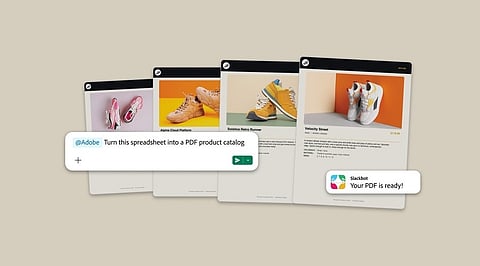
.png)

Adobe brings more than 70 creative and productivity tools directly into Slack for professionals.
Slackbot helps users create, edit, and refine content using Adobe's creative applications.
Teams can access Creative Cloud assets, feedback, project context, and collaboration tools within Slack.
Adobe introduced Adobe for Slack, bringing more than 70 pro-grade creative and productivity tools directly into Slack. The integration is designed to help teams create, refine, and share images, videos, documents, and other content without leaving their conversations. It is available globally to Slack Business+ and Enterprise+ customers across desktop, web and mobile.
Adobe for Slack connects Adobe’s creative and productivity tools with Slackbot, Slack’s built-in personal AI teammate. Users can describe what they want to create or edit in their own words, after which Slackbot can call on the appropriate Adobe tools.
The integration includes tools from Firefly, Adobe Express, Photoshop, Premiere, Acrobat, InDesign, Illustrator, Stock, Lightroom and more. Adobe says users can also ask Slackbot to bring relevant context from conversations, files, channels, and Canvases into the creative process.
For creative professionals, the key change is that tasks that previously required moving between Slack and Adobe applications can now be initiated directly within Slack.
Also Read: Adobe Names Anil Chakravarthy CEO, Narayen Moves to Executive Chair
A project brief, feedback, or reference file often starts in a Slack conversation. Adobe for Slack allows users to use that existing information to create content.
Users can ask Slackbot to find and summarise information from a conversation or Canvas, then use the Adobe app to turn that context into PDFs, images, and videos that can be shared with the team.
The integration can also search Creative Cloud assets by subject, style or mood. This allows teams to find content from previous projects or campaigns and bring those assets into the Slack workflow for further editing.
Adobe for Slack is also aimed at teams that regularly adapt creative assets for different platforms.
Approved images and videos can be used to create variations sized for social channels. Users can also browse thousands of design templates, select one for a project, customize copy and colors, animate it for social media, or turn it into a print-ready PDF.
For teams working with data, a spreadsheet can be brought into the workflow and transformed into a PDF or visual that can be shared with colleagues or clients.
Also Read: Adobe Acquires Indian AI Startup Rilo to Boost Marketing Automation
The integration also supports bulk image refinement. Creative professionals can work with sets of images, including team headshots, event photos, and product imagery.
Tasks such as removing backgrounds and distractions, adjusting lighting and tone, and cropping and resizing can be handled from Slack. This can be useful for teams dealing with large batches of images where repetitive edits would otherwise take additional time.
Adobe for Slack also allows users to continue refining their work through conversation. They can ask Slackbot to make another edit or create a variation before sharing the result in a team channel for review.
The Slack integration is not positioned as a replacement for Adobe’s dedicated applications.
When users need greater creative control, pixel-level precision, or additional document capabilities, they can continue working in Adobe Express, Photoshop, Premiere, Acrobat, and Firefly. The Slack workflow is intended to bring creation closer to the conversations where projects are already being discussed.
Setting up Adobe for Slack involves a few steps:
Open a direct message with Slackbot and select Apps, followed by Manage Apps.
Select the + icon next to Adobe and either continue as a guest or sign in with an Adobe account.
Once connected, start a conversation with Slackbot and ask Adobe to create, edit, or transform content.
Users can start using the Adobe app without an Adobe account. However, signing in or creating a free Adobe account unlocks additional tools and skills, generative AI capabilities, access to Creative Cloud files, and continuity across sessions.
Adobe for Slack is available globally to Slack Business+ and Enterprise+ customers across desktop, web, and mobile. The launch is part of Adobe’s broader effort to make its creative and productivity tools available through AI chatbot platforms people already use, including ChatGPT and Claude, with Gemini coming soon.
For creative professionals, the integration brings more of the production process into the place where briefs, feedback, and collaboration already happen.
Instead of treating Slack as only a communication layer around creative work, Adobe for Slack makes it possible to use conversations and existing project context as a starting point for creating and refining content.
What was Adobe for Slack?
Adobe for Slack brought more than 70 Adobe creative and productivity tools directly into Slack to make content creation easier.
Which Adobe tools worked with Slack?
The integration included Firefly, Adobe Express, Photoshop, Premiere, Acrobat, InDesign, Illustrator, Stock, Lightroom, and other Adobe tools.
Who could access Adobe for Slack?
Adobe for Slack became available globally to Slack Business+ and Enterprise+ customers on desktop, web, and mobile.
What could creative professionals do through Adobe for Slack?
Users could create, edit, and refine content, access Creative Cloud assets, transform files, and collaborate without leaving Slack.
Did users need an Adobe account to use Adobe for Slack?
Users could start without an Adobe account, while signing in unlocked additional tools, generative AI features, and Creative Cloud access.
