.png)

Winamp Player lets users play and organize locally stored music across supported devices.
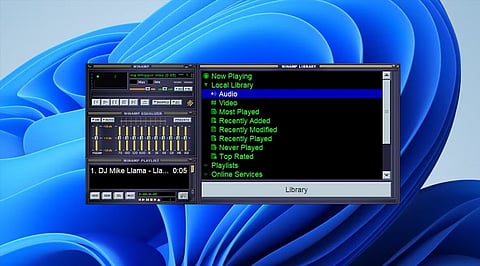
Its features include playlists, customizable layouts, skins, equalizer controls, and library management.
The newer Winamp ecosystem also supports mobile listening and cloud-based music experiences.
Looking for a dedicated music player for your personal audio collection? Winamp Player lets users listen to locally stored music and organize content by artist, album, playlist, or folder. The official Winamp website provides access to the player and its latest offerings.
Winamp is a well-known name in digital music playback, with a history that stretches back to the early days of MP3 software. The current Winamp Player focuses on giving listeners more control over their music experience.
Users can access locally stored audio and organize it by artist, album, playlist, and folder. The player also emphasizes customization, allowing users to configure layouts and actions according to their preferences.
Winamp has also been expanding beyond traditional local playback. Its newer mobile apps support local and cloud-based tracks, playlists, radios, podcasts, and artist-focused features.
Download Winamp
Local music playback: Play audio stored on your device without relying entirely on streaming services.
Music organization: Browse and manage tracks by artist, album, playlist, or folder.
Custom layouts: Users can configure button placement and actions to create a more personalized interface.
Custom skins: Winamp allows users to create visual skins, making the player more distinctive.
Mobile listening: Winamp's newer apps extend the experience to iOS and Android devices, with support for local and cloud tracks.
Compatibility depends on the specific Winamp release. Winamp's current ecosystem includes Windows-based player software as well as iOS and Android applications. The official player page does not provide a single universal hardware requirement list, so users should check the download page for requirements associated with their selected version.
Start by downloading Winamp from the official website or the relevant mobile app store. Open the application and provide access to your music library where required.
You can then browse your collection by artist, album, playlist, or folder. Create playlists for different listening sessions, adjust the player layout to suit your preferences, and explore customization options such as skins.
Pros
Supports locally stored music
Flexible music organization
Customizable interface
Custom skin support
Available across modern mobile platforms
Cons
Some specifications vary between versions
Advanced features may differ by platform
Users should check current requirements before installation
If you want to explore other music players, popular alternatives include VLC Media Player, MusicBee, foobar2000, and AIMP. These applications offer different combinations of local playback, library management, customization, and audio controls.
Winamp Player is music and audio software designed for playing and organizing digital media. It has a long history in computer-based music playback. Users can manage local tracks through artists, albums, playlists, and folders. The current Winamp ecosystem also includes mobile applications and additional listening features.
Winamp provides a free download option through its official player website. However, licensing and available features can vary depending on the version and platform. Users should check the official Winamp download page before installing the software. This provides the most current information about supported versions and available options.
The provided information lists Windows as a supported platform for Winamp Player. The current Winamp ecosystem also includes applications for iOS and Android. Availability and features can differ between platforms. Users should therefore check the official Winamp website or relevant app store before downloading a specific version.
Yes, local music playback is one of Winamp's core capabilities. Users can access audio files stored on their devices and organize them within the player. This makes Winamp useful for people who maintain personal digital music collections. The platform does not require users to rely entirely on streaming services.
The provided specifications list several supported audio formats. These include MP3, AAC, WAV, FLAC, and MIDI, among others. Support can vary between different versions and platforms. Users with specialized audio files should therefore check the specifications for their particular Winamp release before installation.
