.png)

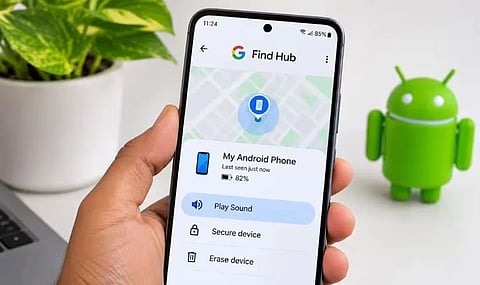
Google Find Hub helps locate lost Android phones through device location and its crowdsourced offline finding network.
Features such as Play sound, Mark as lost, and Factory reset help protect devices and personal data.
Compatible Bluetooth trackers help locate everyday items such as keys, wallets, bags, and suitcases.
A lost phone can expose personal photos, private messages, bank details, and other sensitive data. Google Find Hub can locate missing Android devices, lock them, and protect personal information. It also works with compatible Bluetooth trackers, headphones and other accessories, and its offline finding network helps when a lost device can't connect to the internet.
Google Find Hub is the updated version of the old Find My Device service. It helps Android users locate lost phones, tablets, watches, headphones, and compatible tracker tags. The service shows a device's current or last known location and comes with several recovery and security tools.
Find Hub also taps a network of nearby Android devices to locate supported devices and accessories, which helps when a lost item has no direct internet connection. The service can be reached through the Find Hub app or the official website at android.com/find.
Google added several features to Find Hub during 2026. A March update brought location sharing to Google Messages, so live location can be shared inside a chat. Another March update let owners share the location link of a compatible luggage tracker with participating airlines, which can help airline staff find lost baggage.
In September, a new Gemini feature arrived to help users remember where they put important items. On supported Android 16 and newer devices, an item's location and an optional photo can be stored. Keys, passports and other personal belongings are the obvious uses.
The Google Play listing also showed a Find Hub app update on November 16, 2026. The app still supports device recovery, offline finding, accessory tracking and location sharing.
Also Read - Google Gemini Expands in India: 7 New AI Features Arrive on Android
There are two simple ways to locate a missing phone, one through a web browser and one through another Android device. Either way, access to the Google Account linked to the lost phone is needed.
For the website method, open android.com/find and sign in with the right Google Account. Pick the missing phone from the device list and check the map, which may show its current position or its last known location.
The second method uses the Find Hub app on another Android phone. Open the app, sign in and select the missing device. Options may include Play sound, Find nearby, Mark as lost and Factory reset. Guest Mode lets someone help a friend find a missing device without making a permanent account change.
Play sound makes the lost phone ring at full volume for five minutes, even if it is set to silent or vibrate. It works well when a phone is under a cushion, inside a bag or somewhere else close by.
Find nearby helps locate a device at close range, provided the phone and its hardware support it. Mark as lost locks the phone and lets the owner put a recovery message and contact details on the lock screen. Factory reset wipes personal data from the device, but it also ends Find Hub access to that phone.
The crowdsourced offline finding network is one of Find Hub's most useful features. A supported lost device or Bluetooth tracker sends out a Bluetooth signal. Nearby Android devices pick it up and pass an encrypted location report to Google's network, and the owner then sees the reported location in Find Hub.
Google offers several offline finding settings, including options for busy places and wider network coverage. What is available depends on the phone and its software. A screen lock with a PIN, pattern or password also supports offline finding.
Some supported phones can report location details for a limited time after shutdown, though this depends on the hardware and the battery reserve. Not every Android phone supports it.
A stolen phone is a serious risk for personal data. Mark as lost should come first, since it locks the device and can show contact details for its return. The mobile carrier is the next call, and a request to suspend the SIM or eSIM can help stop misuse.
Google Account security needs attention too. Reviewing account access, passwords and recovery details helps protect private information. If the phone held financial apps or saved payment details, bank accounts and payment services may need extra security checks.
A police report can help with a theft case, and the phone's International Mobile Equipment Identity (IMEI) number may support both the report and the carrier request. A remote factory reset should be the last option, used when recovery looks unlikely and data safety matters most.
Google says Find Hub protects location reports from the offline network with end-to-end encryption, which means Google can't read the encrypted location details. Users also control location sharing and can review who has access to shared locations.
Compatible Bluetooth trackers from brands such as Pebblebee and Chipolo work with Find Hub, and they can help locate keys, wallets, bags and suitcases. Samsung Galaxy SmartTags are the exception, as they use Samsung's SmartThings Find service instead of Google's Find Hub network.
Also Read - Google Launches Pixel Tag with Find Hub, UWB and Channel Sounding
Find Hub is more than a basic phone locator. Its recovery tools, offline network, tracker support and security options give Android users several ways to protect lost devices and personal data. The best results come from preparation before a phone goes missing: An active Google Account, a secure screen lock and the right Find Hub settings can make a real difference when the moment arrives.
1. What is Android Find Hub?
Android Find Hub is Google's device recovery service that helps users locate lost Android phones, tablets, headphones, and compatible Bluetooth trackers.
2. Can Google Find Hub locate a phone without internet access?
Yes. Its crowdsourced offline finding network can use nearby Android devices to help locate supported phones and accessories without a direct internet connection.
3. Can Find Hub lock a stolen Android phone?
Yes. The Mark as lost feature locks the device and allows a recovery message and contact details on the lock screen.
4. Can Find Hub erase data from a lost phone?
Yes. The Factory reset option can remotely erase personal data. However, the phone will no longer remain available through Find Hub after the reset.
5. Is Google Find Hub free to use?
Yes. The Find Hub app is available through Google Play without a separate subscription fee. Standard mobile data charges may apply.